


SocialTools
Social features for MODX: send and read messages, inbox and outbox

SocialTools adds social features to MODX. Send and read messages, view inbox and outbox.
Create a resource with the message send form.
[[!socDialogForm]]Create a resource for the inbox list.
This example uses pdoPage; you can use getPage.
[[!pdoPage?
  &element=`socDialogList`
  &action=`inbox`
]]

[[+page.nav]]
Create a resource for the outbox list.
This example uses pdoPage; you can use getPage.
[[!pdoPage?
  &element=`socDialogList`
  &action=`outbox`
]]

[[+page.nav]]
Create a resource for reading a message.
[[!socDialogReceive]]Edit default chunks.
Set readMsgResourceID to the ID of your read-message resource. Set formSendResourceID to the ID of your send-form resource.
[[!+socIsRead:notempty=`New messages! ([[!+socIsRead]])`]]social-container (fixed width; adjust in CSS).social-listheader, social-msgcontent - max-width limits width, overflow gets ellipsis. Used for message list.If you change social-container, adjust social-listheader and social-msgcontent accordingly.
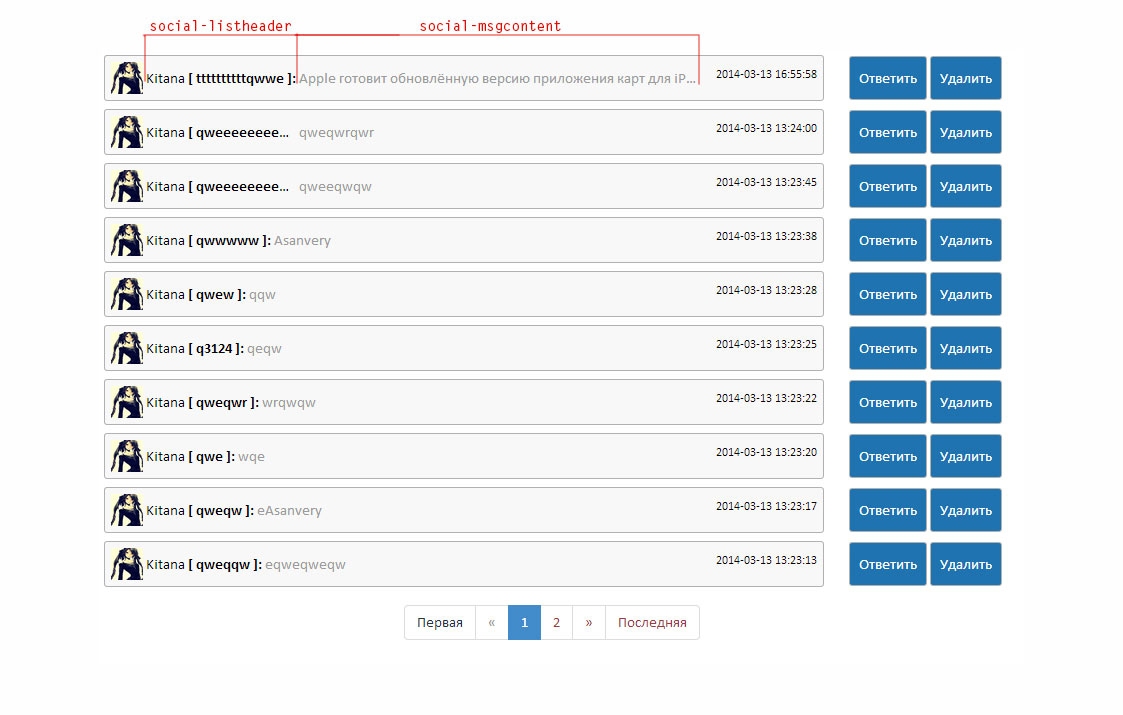
Подсказка
You can create custom chunks with your own CSS based on the defaults.