



Product options
Open Extras → MiniShop3 → Settings → Options.
Starting with v1.10.0-beta1
Options UI is on Vue 3 + PrimeVue. Old ExtJS windows and processors Processors/Settings/Option/*, Processors/Category/Option/* are removed. All operations go through /api/mgr/options/* and /api/mgr/categories/{id}/options/*.
Purpose
Options store product attributes (EAV): color, size, material, any key of your own. The component does not change core MODX tables.
Interface
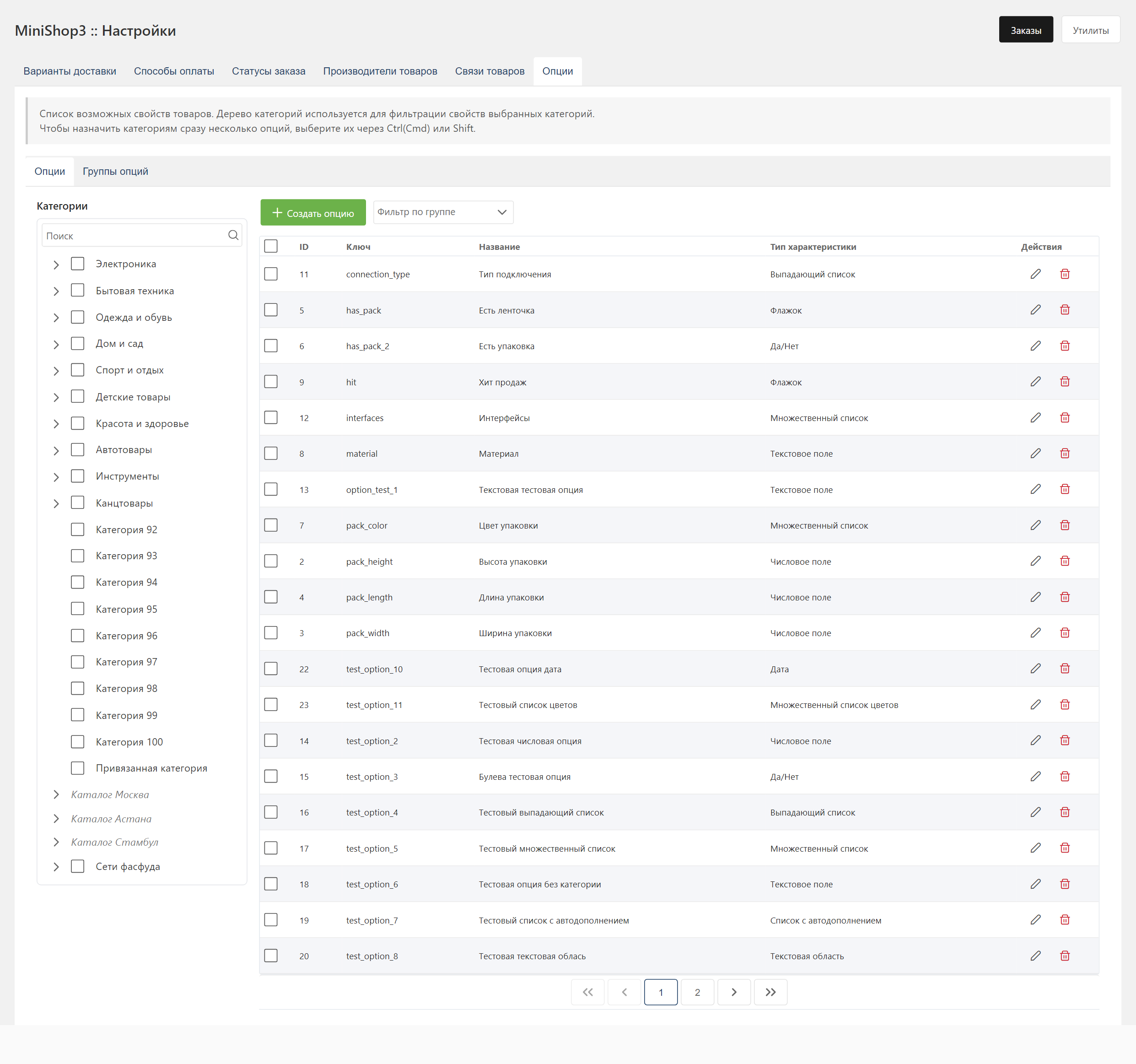
Options tab
- Left: the catalogue tree. Only categories (
class_key = msCategory) can be picked; navigation containers and web links are shown for navigation and carryselectable: false. Checkboxes are independent: checking a parent does not select its children. The context menu works on a branch — five items: Refresh Directory, Expand tree, Collapse tree, Select All, Clear All. There is also a search by name. - Right: options grid. Filters: selected categories and group (
option_group_id). Bulk actions: assign options to categories, delete.
Create and edit dialog: form on the left (key, caption, description, type, msOptionGroup group, unit), category tree on the right for binding. For combobox / comboMultiple / comboColors there is a value editor with drag-and-drop ordering. For comboColors, a ColorPicker sits next to the hex field.
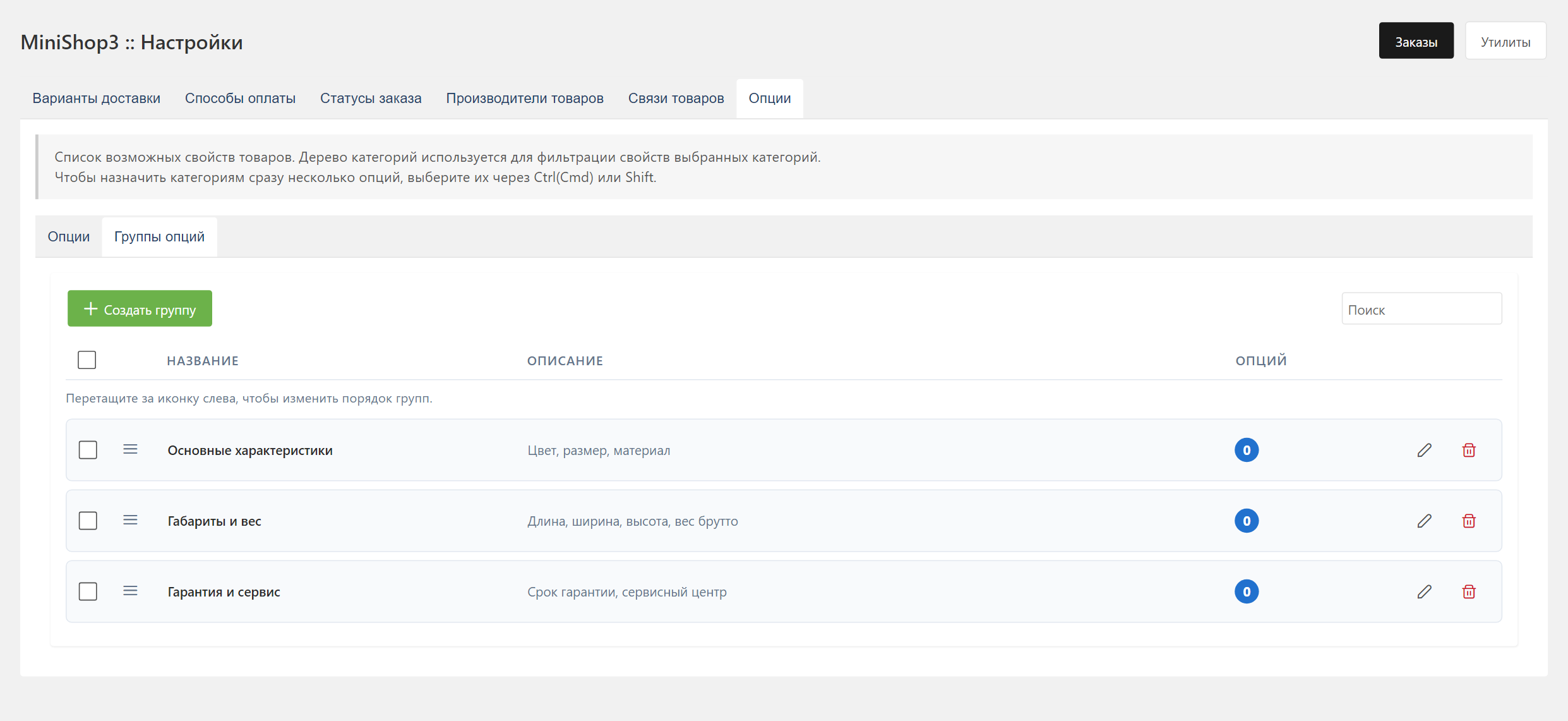
Option groups tab
The tab manages msOptionGroup: create, edit, delete, and reorder groups by dragging. Groups live in table ms3_option_groups (name, description, sort_order). This is not modCategory: categories from other packages no longer clutter the list.
An option has an option_group_id field. Deleting a group only unlinks its options (option_group_id = NULL). The options themselves stay.
Breaking changes (v1.11)
Existing groups are migrated during the upgrade. Two things you have to fix by hand:
- in chunks, replace
{$option.category_name}and{$option.category}with{$option.group_name}; - in your own code, call
/api/mgr/option-groupsinstead of the removed/api/mgr/options/modcategories.
Option fields
| Field | Type | Description |
|---|---|---|
key | string | Unique option key (Latin letters, digits, _, -). It cannot start with a digit or a non-letter character, and it cannot match a reserved name — see below |
caption | string | Display name |
description | text | Option description |
measure_unit | string | Unit of measure (pcs, kg, cm) |
option_group_id | int / null | msOptionGroup group. Optional |
type | string | Value type (see below) |
properties | JSON | Extra settings (for list-based types) |
Key restrictions
The model checks key with two rules. The first is the format: Latin letters, digits, _ and -; the key cannot start with a digit or a non-letter character and cannot end with a space. A violation raises ms3_option_err_invalid_key.
The second is a list of reserved names, about sixty of them. It covers every MODX resource field (id, pagetitle, alias, parent, template, menuindex, published, content, uri, class_key and the rest) and every product column (article, price, old_price, weight, image, thumb, vendor, made_in, new, popular, favorite, tags, color, size), plus type, description, source and action. A match raises ms3_option_err_reserved_key.
The ban is not arbitrary: option placeholders and product fields land in the same array, and a clashing key would shadow the product field. When you need an option with that meaning, add a prefix — opt_color, my_size.
Option types
Type is stored in msOption.type as lowerCamelCase. All 10 supported types:
| type | Description | Value editor in settings | UI on product card |
|---|---|---|---|
textfield | Single-line text | — | InputText |
textarea | Multiline text | — | Textarea |
numberfield | Number | — | InputNumber |
datefield | Date | — | DatePicker (YYYY-MM-DD) |
checkbox | Checkbox (Yes / No) | — | Checkbox |
comboBoolean | Yes / No dropdown | — | Select with two values |
combobox | Single select from list | String list, ordered by dragging | Select |
comboMultiple | Multiple select from list | String list, ordered by dragging | MultiSelect |
comboColors | Multiple select with colors | List {value, name=hex} + ColorPicker | MultiSelect with color squares |
comboOptions | Free-form tags with autocomplete | — (values accumulate when saving products) | PrimeVue InputChips + suggestions from previously entered values |
properties structure for list types
combobox, comboMultiple:
json
{
  "values": ["S", "M", "L", "XL"]
}
comboColors (hex stored in name, display label in value):
json
{
  "values": [
    { "value": "Red", "name": "#FF0000" },
    { "value": "Blue",   "name": "#0000FF" }
  ]
}
comboOptions does not require a preset list. On the product card you type any text. Enter, a comma, or a click outside the field commits the value. Autocomplete takes values of the same key from all products via /api/mgr/options/suggestions — the current product is not excluded from the set.
Category binding
Options appear only on products in bound categories. There are three ways to bind:
- In the option dialog. Check categories in the tree on the right.
- On the category card, Options tab. Add the option there.
- In the options grid. Select several options and click "Assign to categories".
Per-category caption / description override
Starting with v1.10.0-beta1
The "option ↔ category" link (msCategoryOption) has its own caption and description.
If an option needs a different caption in this category, set it in the category options grid (inline edit in the "Caption (for category)" column) or in the "Add option" dialog. An empty field means the global caption is used. A filled one shows up in the manager on products of that category and on the frontend via OptionLoaderService::loadForProduct / loadForProducts.
A product in several categories. If the parent and the additional categories have different captions, this order applies:
- Product parent category (
msProduct.parent) - Lower
msCategoryOption.position - Lower
category_id(this decides when the positions are equal)
Via PHP
php
/** @var \MiniShop3\Model\msOption $option */
$option = $modx->getObject(\MiniShop3\Model\msOption::class, ['key' => 'color']);
$option->setCategories([5, 10, 15]); // Category IDs

// Via service (with caption/description override support):
$optionService = $modx->services->get('ms3_option_service');
$optionService->addOptionToCategory(
    optionId: $option->get('id'),
    categoryId: 5,
    defaultValue: 'Red',
    active: true,
    position: 0,
    caption: 'Upholstery color',       // override for this category
    description: null
);
Product option values
Values are stored in ms3_product_options (product_id, key, value). For multi-value types (comboMultiple, comboColors, comboOptions) a product gets several rows with the same key.
Adding a value
php
$modx->services->get('ms3_option_service')->saveProductOptions(
    productId: 123,
    options: [
        'color' => 'Red',            // single value
        'size' => ['S', 'M', 'L'],   // multi value
    ],
    removeOther: true                     // remove keys not listed in $options
);
Getting values
The usual path is OptionLoaderService:
php
$loader = $modx->services->get('ms3_option_service')->getLoader();

// Single product (with per-category caption override applied)
$data = $loader->loadForProduct(123);
// $data = [
//   'color'         => ['Red'],
//   'color.caption' => 'Upholstery color',  // override from msCategoryOption (if set)
//   'size'          => ['S', 'M'],
//   ...
// ]

// Catalog (batch, no N+1)
$byProduct = $loader->loadForProducts([123, 124, 125]);
Displaying options
msOptions snippet
Lists options for filtering:
fenom
{'msOptions' | snippet : [
    'tpl' => 'tpl.msOptions.row',
    'parents' => 5
]}
msProductOptions snippet
Shows options for a specific product:
fenom
{'msProductOptions' | snippet : [
    'product' => $id,
    'tpl' => 'tpl.msProductOptions.row'
]}
On the product page
Options are available in the template through the $options variable:
fenom
{if $options?}
<div class="product-options">
    {foreach $options as $key => $value}
    <div class="option">
        <span class="option-name">{$key}:</span>
        <span class="option-value">{$value}</span>
    </div>
    {/foreach}
</div>
{/if}
Options in the cart
When adding a product to the cart you can pass selected options:
JavaScript (Web API)
javascript
await ms3.cartAPI.add(123, 1, { color: 'Red', size: 'L' })Display in cart
Options are stored on the cart line and available in the chunk:
fenom
{if $options?}
    {foreach $options as $key => $value}
        <small>{$key}: {$value}</small>
    {/foreach}
{/if}
REST API
All UI operations go through the Manager API (/assets/components/minishop3/connector.php, action MiniShop3\Processors\Api\Router). Permissions: mssetting_save for options, mscategory_save for category binding.
Options
| Method | Path | Description |
|---|---|---|
GET | /api/mgr/options | List. Params: start, limit, query (LIKE on key and caption), option_group_id (0 = no group), category_id, categories[] |
GET | /api/mgr/options/{id} | One option + categories map |
POST | /api/mgr/options | Create (key, caption, type, option_group_id, properties, categories, …) |
PUT | /api/mgr/options/{id} | Update (partial) |
DELETE | /api/mgr/options/{id} | Delete option (product values are deleted as a cascade) |
DELETE | /api/mgr/options/bulk | Bulk delete (ids[]) |
POST | /api/mgr/options/bulk/assign | Assign options[] to categories[] |
GET | /api/mgr/options/types | Type list |
GET | /api/mgr/options/tree | msCategory category tree (lazy by parent) |
GET | /api/mgr/options/suggestions | Unique values for comboOptions (key, query, limit) |
GET | /api/mgr/option-groups | Group list |
POST | /api/mgr/option-groups | Create group |
GET / PUT / DELETE | /api/mgr/option-groups/{id} | Read, update, delete |
PUT | /api/mgr/option-groups/positions | Order after drag-and-drop |
DELETE | /api/mgr/option-groups/bulk | Bulk delete |
Category bindings
| Method | Path | Description |
|---|---|---|
GET | /api/mgr/categories/{category_id}/options | Options bound to category (with global_caption/global_description + category_caption/category_description override) |
POST | /api/mgr/categories/{category_id}/options | Add option to category (option_id, value, active, required, caption, description) |
PUT | /api/mgr/categories/{category_id}/options/{option_id} | Partial update of binding (value / active / required / position / caption / description) |
DELETE | /api/mgr/categories/{category_id}/options/{option_id} | Remove binding |
POST | /api/mgr/categories/{category_id}/options/sort | Save new order (option_ids[]) |
POST | /api/mgr/categories/{category_id}/options/bulk | Bulk actions: activate / deactivate / require / unrequire / remove for option_ids[] |
POST | /api/mgr/categories/{category_id}/options/duplicate | Copy all bindings from another category (category_from), skipping existing |
Option import
When importing products from CSV, options are created automatically from columns with the option. prefix (a dot, not an underscore):
| pagetitle | price | option.color | option.size |
|---|---|---|---|
| T-shirt | 1500 | Red | L |
| T-shirt | 1500 | Blue | M |
Options color and size are created on their own if they are missing. The default type is textfield. You can change it later in the interface.