



Utilities: Extra fields
Your own columns on MiniShop3 models, without editing the core. The field is written to the database and shows up on manager forms.
Cookbook
Step-by-step cases (order, repeater, key-value): Extra fields cookbook. Examples: order field, product wholesale price.
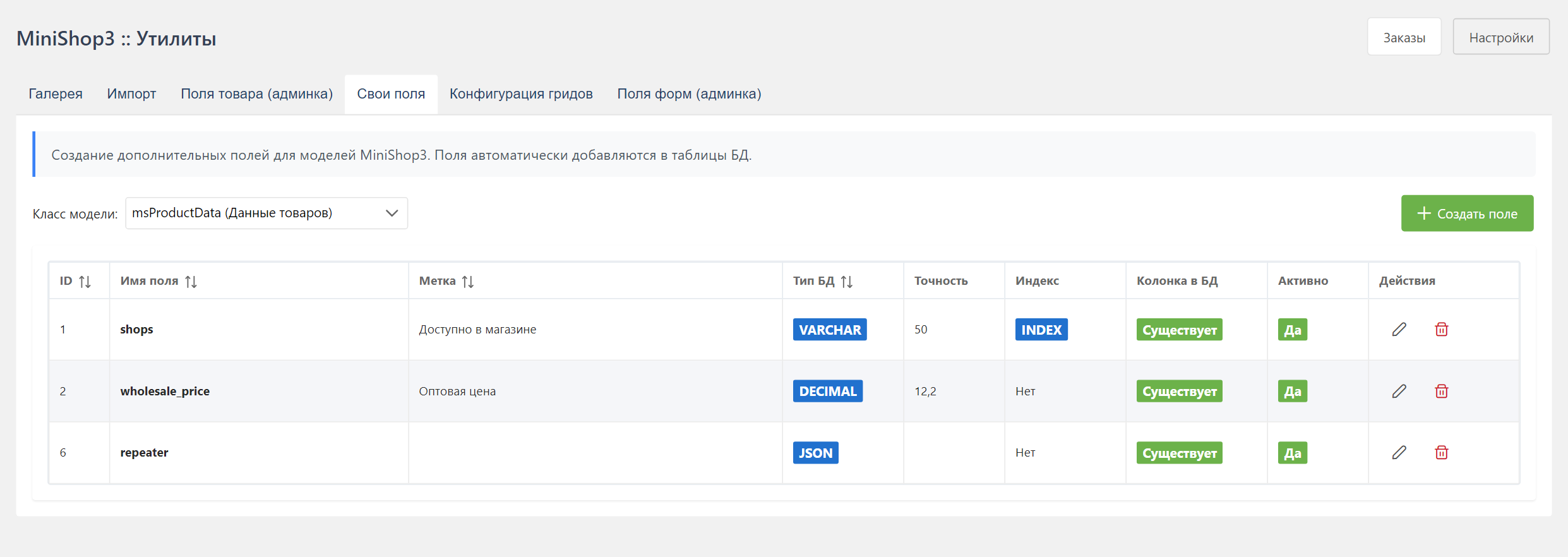
Purpose
You set a key, a widget type, and a column type. After the column migration, the field is available on the model card and, for a product, in CSV import.
Supported models
In the UI you pick a short name. The database and POST store the full MiniShop3\Model\... class.
| Short name | Class in API / DB | Description |
|---|---|---|
msProduct | MiniShop3\Model\msProduct | An extra field cannot be added: the model has no table of its own, it extends modResource. Product columns belong on msProductData |
msProductData | MiniShop3\Model\msProductData | Product data |
msCategory | MiniShop3\Model\msCategory | An extra field cannot be added, for the same reason: a category also extends modResource. For custom category data use MODX TVs |
msVendor | MiniShop3\Model\msVendor | Vendor |
msOption | MiniShop3\Model\msOption | Option |
msLink | MiniShop3\Model\msLink | Link type |
msOrder | MiniShop3\Model\msOrder | Order |
msOrderAddress | MiniShop3\Model\msOrderAddress | Delivery address |
msOrderProduct | MiniShop3\Model\msOrderProduct | Order line |
msOrderStatus | MiniShop3\Model\msOrderStatus | Order status |
msCustomer | MiniShop3\Model\msCustomer | Customer |
msCustomerAddress | MiniShop3\Model\msCustomerAddress | Customer address |
msDelivery | MiniShop3\Model\msDelivery | Delivery |
msPayment | MiniShop3\Model\msPayment | Payment |
Reading the schema (GET /api/mgr/extra-fields) is available to any authenticated manager. Order and product forms load it without a separate permission. mssetting_save is required only to create, edit, and delete fields.
Creating a field
- Pick the model in the list at the top of the page.
- Click Add field and fill the form.
Field parameters
Basic
| Parameter | Description | Required |
|---|---|---|
| Key | Unique field name. The pattern is ^[a-z0-9_]+$, case-insensitive; MySQL 8 reserved words are refused | Yes |
| Label | Display name | No — an empty one falls back to the field key |
| Description | Hint for the user | No |
| Active | The field is in use | Yes |
| Allow NULL (null) | The column accepts NULL | No |
| Attributes (attributes) | unsigned for an unsigned number, auto_increment for an identity column. They reach the migration as signed => false and identity => true | No |
Field key
The key must be unique within the model. Use Latin letters and underscores. For example: wholesale_price, external_id, custom_field.
Widget type (xtype)
| Type | Description | Use |
|---|---|---|
textfield | Text field | Strings, SKUs |
numberfield | Number field | Prices, quantities |
textarea | Multiline field | Descriptions |
xcheckbox | Checkbox | Yes or no |
ms3-combo-select | Fixed dropdown | Statuses, delivery types |
ms3-combo-vendor | Vendor picker | Link to a vendor |
ms3-combo-autocomplete | Autocomplete | Pick from a list |
ms3-combo-options | Option picker | Product variants |
ms3-repeater | Table of rows (JSON) | Composition, a list of characteristics |
ms3-key-value | Key to value (JSON) | A set of named properties |
datefield | Date field | Dates. The interface sets dbtype to date or datetime itself |
Dropdown (ms3-combo-select)
The choices are entered in the «Select options» field of the dialog and stored in select_options. The format is one line per choice, value and label separated by ==:
text
value1==First option
value2==Second option
value3==Third option
With no label the list shows the value itself. Unlike the combo fields of Model fields, there is no database source here — only a fixed list.
Repeater (ms3-repeater)
Since v1.12. In properties or the widget config, set repeater_config:
json
{
  "columns": [
    { "key": "name", "label": "Name" },
    { "key": "qty", "label": "Qty", "xtype": "numberfield" }
  ],
  "minRows": 0,
  "maxRows": 50,
  "sortable": true,
  "rankField": "rank"
}
The database type is forced: choosing ms3-repeater sets dbtype: json, phptype: json, an empty precision and null: true, and a manual choice is ignored. ms3-key-value behaves the same. These fields do not enter CSV import.
Key-value (ms3-key-value)
Config key_value_config:
json
{
  "mode": "fixed",
  "keys": [
    { "key": "width", "label": "Width", "valueType": "number", "required": false },
    { "key": "material", "label": "Material", "valueType": "string", "required": true }
  ]
}
fixed allows only the listed keys. free lets you add pairs yourself.
Database type (dbtype)
| Type | Description | Example values |
|---|---|---|
varchar | Variable-length string | Text up to 255 characters |
text | Long text | Descriptions, HTML |
int | Integer | IDs, quantities |
decimal | Decimal number | Prices with cents |
tinyint | Small integer (0-255) | Flags, ratings |
date | Date without time | 2024-01-15 |
datetime | Date and time | 2024-01-15 12:30:00 |
timestamp | Timestamp | Unix timestamp |
json | JSON data | Arrays, objects |
Precision
For varchar and decimal:
varchar: maximum string length (default 255)decimal: format10,2(10 digits in total, 2 after the decimal mark)
PHP type (phptype)
| Type | Description |
|---|---|
string | String |
integer | Integer |
float | Floating-point number |
boolean | Boolean |
json | JSON (encoded and decoded automatically) |
datetime | DateTime object |
timestamp | Unix timestamp |
Default value
| Type | Description |
|---|---|
NULL | Empty value |
CURRENT_TIMESTAMP | Current time (for datetime) |
USER_DEFINED | Set it yourself |
NONE | No default |
Indexing
| Type | Description | When to use |
|---|---|---|
NONE | No index | Rarely used fields |
INDEX | Ordinary index | Fields used for search and sorting |
UNIQUE | Unique index | Fields with unique values |
FULLTEXT | Full-text index | Text search |
Field examples
Wholesale price
text
Key: wholesale_price
Label: Wholesale price
xtype: numberfield
dbtype: decimal
Precision: 12,2
phptype: float
Default: NULL
Index: NONE
External ID (1C)
text
Key: external_id
Label: ID in 1C
xtype: textfield
dbtype: varchar
Precision: 50
phptype: string
Default: NULL
Index: UNIQUE
Delivery time
text
Key: delivery_days
Label: Delivery time (days)
xtype: numberfield
dbtype: int
phptype: integer
Default: USER_DEFINED → 3
Index: NONE
Extra characteristics (JSON)
text
Key: extra_attributes
Label: Extra characteristics
xtype: textarea
dbtype: json
phptype: json
Default: NULL
Index: NONE
Where «Precision» goes
The value reaches the migration differently depending on the database type: for varchar, char, int, tinyint and smallint it becomes limit; for decimal, float and double written with a comma (12,2) it becomes a limit and scale pair. For other types the field is ignored.
Editing a field
Click the field row. The edit dialog opens.
Limits
After creation only the label, the description, the widget type, the active flag and the widget configs can change — label, description, xtype, active, select_options, repeater_config, key_value_config.
Everything else is fixed: the field key, class, dbtype, phptype, precision, null, default, default_value, attributes, index_type. To change them, delete the field and create it again.
What else happens on creation
For msProductData fields the service also creates a row in ms3_product_fields — which is why the field appears in the Product fields utility right away, with no section, width 6 (12 for ms3-repeater and ms3-key-value) and order 999. Deleting the field removes that row.
For classes without a table of their own no DROP COLUMN runs: only the field metadata is deleted.
Deleting a field
- Click the delete icon on the field row
- Confirm in the dialog
Caution
Deleting a field is irreversible. You lose:
- the field definition in the schema
- the column in the database table
- every value of this field on every record
Use in code
Reading a value
php
// Get the product
$product = $modx->getObject(\MiniShop3\Model\msProduct::class, $id);

// Get the product data
$data = $product->getOne('Data');

// Read the extra field
$wholesalePrice = $data->get('wholesale_price');
Saving a value
php
$data = $product->getOne('Data');
$data->set('wholesale_price', 999.99);
$data->save();
In snippets (Fenom)
fenom
{$wholesale_price}
{if $wholesale_price > 0}
    <span class="wholesale">Wholesale: {$wholesale_price | number_format : 0} RUB</span>
{/if}
API endpoints
List fields of a model
http
GET /api/mgr/extra-fields?class=MiniShop3\Model\msProductDataCreate a field
http
POST /api/mgr/extra-fieldsRequest body:
json
{
  "class": "MiniShop3\\Model\\msProductData",
  "key": "wholesale_price",
  "label": "Wholesale price",
  "xtype": "numberfield",
  "dbtype": "decimal",
  "precision": "12,2",
  "phptype": "float",
  "null": true,
  "default": "NULL",
  "index_type": "NONE",
  "active": true
}
Update a field
http
PUT /api/mgr/extra-fields/{id}Delete a field
http
DELETE /api/mgr/extra-fields/{id}Migrations
When you create a field:
- A row is created in the field configuration table
- A column is added to the model table (ALTER TABLE)
- An index is created (if you asked for one)
When you delete a field:
- The configuration row is removed
- The column is removed from the database table