



Payment methods
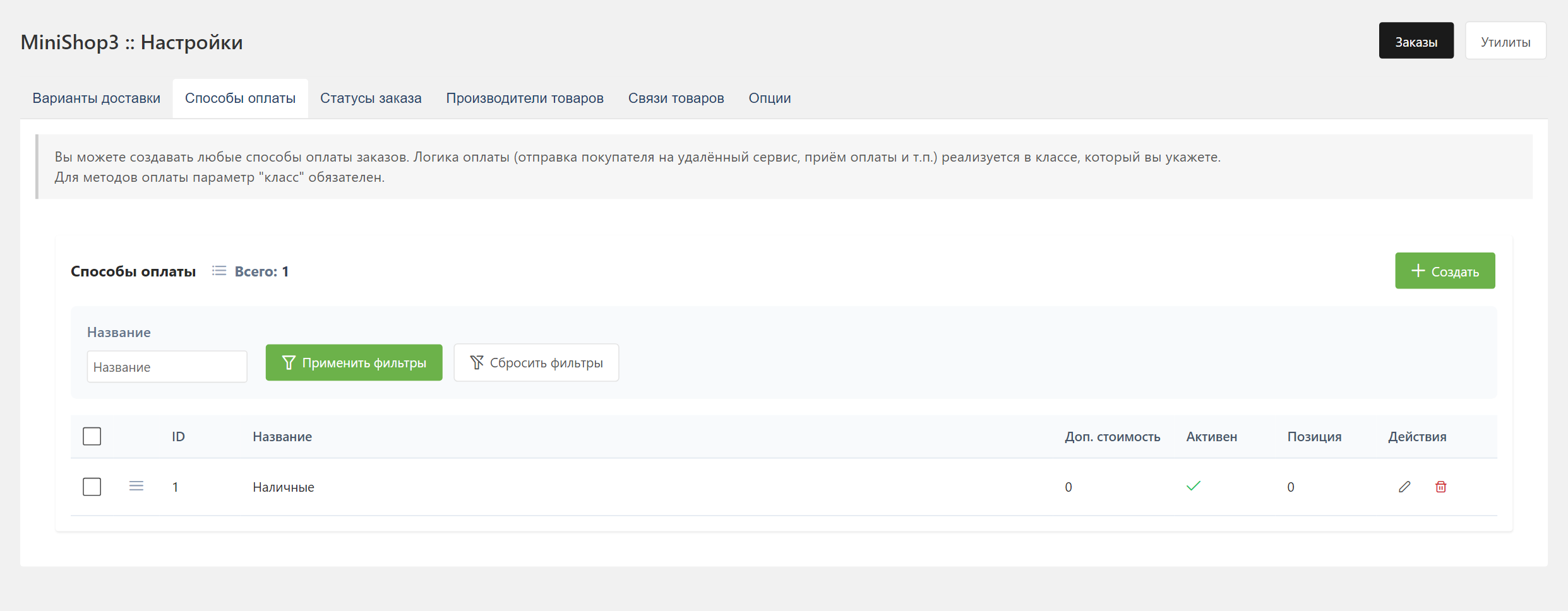
Open Extras → MiniShop3 → Settings → Payments.
For the store owner
- Create a payment method: name, description, logo, and the active flag.
- Link it to the deliveries you need. Without that link an unlinked pair can still be selected at the
order/addstep — the refusal comes later, atorder/submit, with thems3_order_err_payment_deliverylexicon entry. - For payment on delivery, leave
classempty. The order stores the selectedpayment_id. - For online payment, install a payment extra from the catalog (for example msp3YooKassa, mspTBank, msp3Sberbank) and set the handler class in
class, as that package's docs describe. - Check the redirect after payment:
ms3_order_success_page_idand the Thank-you page withmsGetOrder.
Surcharge in the price field:
100is a fixed amount added to the order3%is a percent of the cart total — delivery is not part of the commission base-5%— a negative value works as a discount
The allowed percent runs from −100 to 100. Outside that range the surcharge is zeroed and the value is written to the error log.
Payment fields
| Field | Type | Description |
|---|---|---|
name | string | Payment method name |
description | text | Description for the customer |
price | string | Surcharge (a number or a percent) |
logo | string | Path to the image |
position | int | Sort order |
active | bool | Active flag |
class | string | PHP class of the payment handler |
properties | JSON | Handler settings |
Link with delivery
You edit the pairs from both sides: on the Payment methods tab of the delivery card and on the Deliveries tab of the payment card (POST and DELETE /api/mgr/payments/{id}/deliveries/{delivery_id}). Both tabs appear only after the record has been saved once. Typical sets:
- Pickup: cash, card on delivery
- Courier: cash, card, online
- Post: cash on delivery, online
Payment handlers
There are no built-in handlers. Online payment comes from a payment extra in the catalog, or from your own class. The class extends the abstract Payment and is set on the payment method card. Ready-made payment services are described in the extra's documentation. Only send() and receive() are required:
php
<?php
namespace MyComponent\Payment;

use MiniShop3\Controllers\Payment\Payment;
use MiniShop3\Model\msOrder;

class MyPayment extends Payment
{
    public function send(msOrder $order): array
    {
        // Create a payment at the provider. return_url: ms3_order_success_page_id
        // Payment row of the method: $this->config['payment']
        return [
            'success' => true,
            'data' => ['payment_link' => '...'],
        ];
    }

    public function receive(msOrder $order): array
    {
        // Provider webhook or callback
        return ['success' => true, 'message' => 'Payment received'];
    }
}
You do not need to override the constructor. The base Payment::__construct(MiniShop3 $ms3, array $config = []) sets $this->modx and $this->ms3. The service builds the handler as new $class($ms3, ['payment' => $payment]). If you need keys from properties, call parent::__construct($ms3, $config) in your own constructor. getCost() (the surcharge from the price field), getPaymentLink(), and getOrderHash() (HMAC-SHA256 over ms3_payment_secret) are already implemented in the base class. Override only your own logic.
Registration in the class field:
text
MyComponent\Payment\MyPaymentPayment service secrets go in properties (JSON) on the payment card. The settings interface does not edit that field — it is absent from both the payment and the delivery dialog: write the value through the Manager API (PUT /api/mgr/payments/{id}), from the payment extra's own page, or directly in the database.
json
{
  "shop_id": "123456",
  "secret_key": "live_xxx...",
  "test_mode": false
}
In code: $this->config['payment']->get('properties').
Payment notifications (webhook / callback)
The core ships a receiver of its own: POST /api/v1/payment/webhook/{payment_method_id}. The route is public — TokenMiddleware lets it through, and the handler verifies the signature itself.
The payment class implements PaymentWebhookHandlerInterface with two methods: verifyWebhook() for authenticity, taking the raw body, the parsed payload and the headers, and parseWebhook() which turns the payload into a PaymentWebhookEvent. For HMAC the base class offers Payment::verifyWebhookHmac(); the secret comes from the payment card properties under secret, secret_key or webhook_secret, and falls back to the ms3_payment_secret system setting. PaymentLifecycleService (the ms3_payment_lifecycle service) applies the event.
Some payment extras still keep a receiver of their own (webhook.php or callback.php under assets/components/{ns}/) — see the docs of that service (msp3YooKassa, mspTBank, and others).
The payment class implements send() and accepts the notification. From that notification it changes the order status. The payment link in emails and in msGetOrder is built by PaymentLinkResolver.
API
Deliveries and payments in the order draft
Public lists (no token): GET /api/v1/delivery/list, GET /api/v1/payment/list. There is no separate GET /api/v1/order/payments.
The draft:
http
GET /api/v1/order/getdata.order holds the order fields, including delivery_id / payment_id and address_*. To change the method, call POST /api/v1/order/add or POST /api/v1/order/set with a wrapper body {"fields": {"payment_id": 2}}. The Fenom storefront can render the choice through msOrder.
Payment cost
The endpoint computes the fee for the payment method already set on the draft and reads no request parameters. To price another method, write it first through order/add or order/set.
http
GET /api/v1/order/cost/paymentResponse:
json
{
    "success": true,
    "data": {
        "cost": 150.00
    }
}
Full totals (cart, delivery, and payment): GET /api/v1/order/cost. Web API map: Checkout.
Payment link (payment_link)
On the thank-you page and in emails, PaymentLinkResolver (ms3_payment_link_resolver) builds the payment URL:
- in msGetOrder, the
payStatusparameter (a CSV of statuses) - in notifications, the setting
ms3_payment_link_statuses(a CSV of status ids, hidden, not declared in System settings, set directly in the database or in code). If it is empty,ms3_status_newis used - the link is not shown for final statuses or the paid status
The payment method handler must return a URL from the payment method (see the send() example above). Details: msGetOrder.