


AjaxForm
Submit forms via Ajax. Uses FormIt, but you can specify your own snippet

Внимание
On June 13, 2023, the MODX RSC team discontinued support for AjaxForm. It will remain available on modstore.pro and extras.modx.com, but we recommend using FetchIt instead.
Snippet for submitting any form via ajax. By default it works with FormIt, but you can use your own snippet.
$scriptProperties to the session when the snippet is called.$scriptProperties.| Name | Default | Description |
|---|---|---|
| &form | tpl.AjaxForm.example | Chunk for the form to process. |
| &snippet | FormIt | Snippet that processes the form. |
| &frontend_css | [[+assetsUrl]]css/default.css | Styles for the form and error fields. |
| &frontend_js | [[+assetsUrl]]js/default.js | JavaScript for submitting the form via ajax. |
| &actionUrl | [[+assetsUrl]]action.php | Connector URL the form is submitted to. |
Everything you pass to AjaxForm is forwarded to the snippet being called.
You can use your own snippet instead of FormIt to do whatever you need (e.g. create pages on the site). The only requirement is that it must return a JSON object with these keys:
For convenience, the snippet receives a $AjaxForm variable (the component class) so you can call its error and success methods when returning a response.
Minimal custom snippet example:
<?php
if (empty($_POST['name'])) {
  return $AjaxForm->error('Form errors', array(
    'name' => 'Name is required'
  ));
}
else {
  return $AjaxForm->success('Validation passed');
}
Call it like this:
[[!AjaxForm?
  &snippet=`MySnippet`
  &form=`tpl.AjaxForm.example`
]]
This snippet only returns the result of validating the name field.
The server can return a form submission error and an object of fields that failed validation. Those fields get the CSS class error automatically; it is removed on the next submit.
You can also block submission using the JavaScript variable afValidated: if it is set and equals false, the form will not be submitted.
Note that all client-side checks can be bypassed, so use this variable only for UX, not for real validation.
<script type="text/javascript">
$(document).on('submit', '.ajax_form', function() {
  // Your validation code here
  console.log(this);

  // Set the global variable
  afValidated = false; // or true if validation passed
});
</script>

[[!AjaxForm]]When the server responds, the af_complete event is fired. You can use it to update the page or run other JavaScript.
Your handler receives the event and the server response object (which also includes the form that was submitted).
$(document).on('af_complete', function (event, response) {
  var form = response.form;
  if (form.attr('id') === 'my_form_3') {
    form.hide();
  }
  else {
    console.log(response)
  }
});Add an id to the form if needed, then in your JS:
$(document).on('af_complete', function (event, response) {
  var form = response.form;
  if (form.attr('id') === 'your_form_id') {
    window.location.href = "[[~page_id]]"
  }
});
You can wrap the code above in <script>...</script> and include it in the template with the form, near the closing </body>.
By default AjaxForm shows success or error messages. You can trigger them yourself:
AjaxForm.Message.success('Green popup');
AjaxForm.Message.error('Red popup', 1);
AjaxForm.Message.info('Black popup');
The second parameter enables a "sticky" popup that must be closed manually (useful for serious errors).
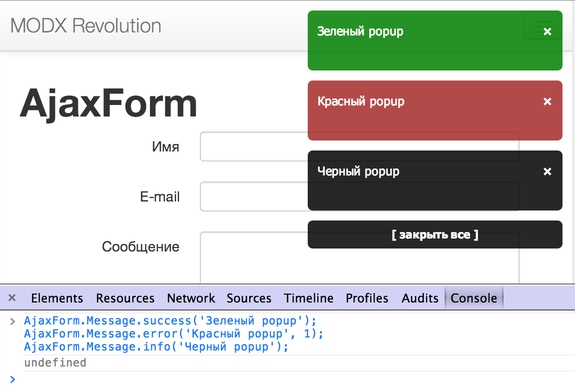
So by simply calling the snippet on a page, you get jQuery.jGrowl and can show popup notifications from JavaScript.
Sending email with FormIt and validating some fields:
[[!AjaxForm?
  &snippet=`FormIt`
  &form=`tpl.AjaxForm.example`
  &hooks=`email`
  &emailSubject=`Test message`
  &emailTo=`info@domain.com`
  &validate=`name:required,email:required,message:required`
  &validationErrorMessage=`The form contains errors!`
  &successMessage=`Message sent successfully`
]]If something goes wrong, first check whether the form works without AjaxForm. Remember that AjaxForm is a wrapper: it does not send email or validate the form; your snippet or FormIt does.
Also check the browser console for JavaScript errors. If the server returns 500 on submit, check the register_globals setting in PHP — it should be off.