



Utilities: Model fields
Fields from the ms3_model_fields table: how existing model columns are shown.
Purpose
You edit labels, widgets, and sections of existing fields. Data in the tables does not change.
Not the same as page-fields
Product fields (ms3_product_fields, page_key=product_data) configure only the Product properties tab on the product card. Extra fields create new database columns. Cookbook: Model fields.
Difference from extra fields
| Aspect | Model fields | Extra fields |
|---|---|---|
| Source | Existing fields in the database | New fields |
| Column creation | No | Yes (ALTER TABLE) |
| Deletion | From the configuration only | Full removal |
| Use | Display setup | Schema extension |
Interface
Model selection
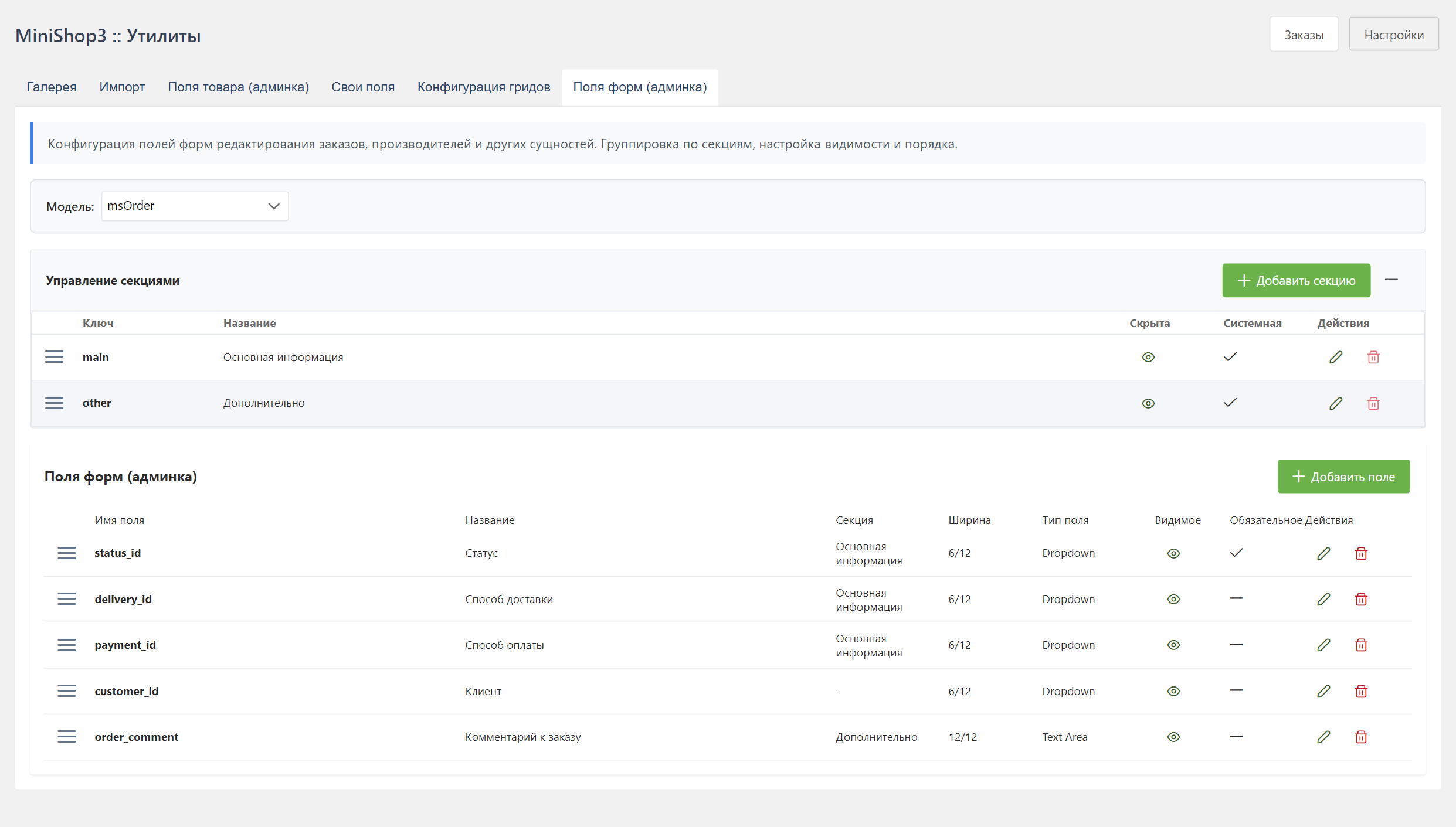
The filter at the top of the page offers 4 models:
- msOrder, orders
- msOrderAddress, addresses
- msOrderProduct, order lines
- msVendor, vendors
msProductData is not in this list. Product data is configured in Product fields.
Sections panel
A collapsible Manage sections panel above the fields table. Columns: drag handle, Key, Title, Hidden, System, Actions.
Fields table
Below the sections panel: fields and their settings.
| Column | Description |
|---|---|
| Field name | System field name |
| Title | Display name |
| Section | Which section the field belongs to |
| Width | Grid width (1–12) |
| Field type | Widget type |
| Visible | Whether the field is shown |
| Required | The field must be filled in |
Editing a field
Click a row. The edit dialog opens.
Basic parameters
| Parameter | Description |
|---|---|
| Field name | The system column name. Required, set at creation |
| Label | Display name of the field |
| Description | Hint under the input |
| Placeholder | Hint text inside the input |
| Section | Group the field is shown in |
| Visibility | Show the field on the form |
| Required | The field cannot be left empty |
| Order | Position of the field inside the section |
Widget type (xtype)
| Type | Description |
|---|---|
textfield | Text field |
numberfield | Number field |
textarea | Multiline field |
combo | Dropdown |
datefield | Date picker |
checkbox | Checkbox |
Grid width
The grid has 12 columns and the width is set with a slider — any integer from 1 to 12. Common values:
| Value | Width | Description |
|---|---|---|
| 3 | 25% | A quarter of the row |
| 4 | 33% | A third of the row |
| 6 | 50% | Half of the row |
| 8 | 67% | Two thirds of the row |
| 12 | 100% | The whole row |
Data source for combo
For the combo type, set a JSON configuration with a required source.type.
A model (a class from the registry):
json
{
  "source": {
    "type": "model",
    "class": "MiniShop3\\Model\\msOption",
    "valueField": "id",
    "labelTemplate": "{caption}",
    "where": {"active": true},
    "sort": {"caption": "ASC"},
    "limit": 500
  }
}
Besides valueField and labelTemplate, a source accepts labelField — a single column for the label, name by default — and sort written as «field: direction». limit defaults to 500: that is a guard against pulling thousands of rows, not a ceiling to remove lightly.
Sources are read in order of priority: the database row, then custom/combos/{model}.php, then the shipped config/combos/{model}.php. The first one found wins.
A static list:
json
{
  "source": {
    "type": "static",
    "options": [
      { "value": "value1", "label": "Option 1" },
      { "value": "value2", "label": "Option 2" }
    ]
  }
}
A url field is not required. There is no ready route GET /api/mgr/options/list. The option list is GET /api/mgr/options.
Section management
Creating a section
- Click "+" on the sections panel
- Fill the form:
| Field | Description |
|---|---|
| Model | Which model the section belongs to. Required, fixed after creation |
| Key | Unique identifier. Fixed after creation |
| Lexicon key | Key for the translated title |
| Label | Display name |
| Hidden | The section is not shown on the form |
| Order | Position in the section list |
Editing a section
Click the edit icon next to the section name.
Deleting a section
Caution
Deleting a section does not delete the fields. They move to No section.
A section flagged as default (is_default) cannot be deleted — the server answers Cannot delete default section. Such sections are marked in the System column.
Section order
Drag sections to change the order.
Usage examples
Hide technical fields
Fields that are usually hidden:
idis generated automaticallycreatedonholds technical datessourcewhen a single source is used
API endpoints
Model list
http
GET /api/mgr/model-fields/modelsResponse:
json
{
  "success": true,
  "data": {
    "models": [
      { "value": "msOrder", "label": "Order" },
      { "value": "msVendor", "label": "Vendor" }
    ]
  }
}
Model field list
http
GET /api/mgr/model-fields?model=msOrderCreate a field
http
POST /api/mgr/model-fieldsThe body is the field parameters (the same ones as in the dialog: label, xtype, section_id, visible, width, …). It requires mssetting_save.
The other endpoints
| Method | Route | Description |
|---|---|---|
GET | /api/mgr/model-fields/{id} | One field |
DELETE | /api/mgr/model-fields/{id} | Delete a field |
GET | /api/mgr/model-fields/visible/{model} | Visible fields of the model only — this is what the order forms use |
GET | /api/mgr/model-fields/combo-options/{model} | Choices for every combo field of the model |
GET | /api/mgr/model-fields/combo-options/{model}/{field_name} | Choices for a single combo field |
The gate on visible and combo-options is softer: any one of the nine MiniShop3 permissions is enough, while writes require mssetting_save. Otherwise the order form would not open for a manager without the settings permission.
Update a field
http
PUT /api/mgr/model-fields/{id}Request body:
json
{
  "label": "Product SKU",
  "xtype": "textfield",
  "section_id": 1,
  "visible": true,
  "width": 6,
  "description": "Unique product code"
}
Reorder fields
http
PUT /api/mgr/model-fields/ranksThe body is JSON with the new field order (the same order as drag-and-drop in the UI). It requires mssetting_save.
Model sections
http
GET /api/mgr/model-fields/sections/msOrderCreate a section
http
POST /api/mgr/model-fields/sectionsRequest body:
json
{
  "model": "msOrder",
  "section_key": "prices",
  "label": "Prices",
  "sort_order": 10
}
Edit a section
http
PUT /api/mgr/model-fields/sections/{id}The body is the section fields you change (label, sort_order, …). It requires mssetting_save.
Reorder sections
http
PUT /api/mgr/model-fields/sections/ranksThe body is JSON with the new section order. It requires mssetting_save.
Delete a section
http
DELETE /api/mgr/model-fields/sections/{id}Relation to other configuration
Do not confuse this screen with Product fields (product_data) or with Grid columns. This screen does not define CSV import or the public API.