


simpleFilters
Simple filtering for MODX 3 resources and MiniShop3 products. Install from the repository via the MODX 3 package installer.
Main features
- Resource fields, TVs, and MIGX fields; MiniShop3 product fields and options.
- Works with standard MODX tables or a dedicated index table.
- AND / OR logic.
- Filter types: checkbox, radio, select, numeric slider (via noUiSlider).
- URL aliases for filters.
- Pagination (paged and “load more”).
- Sorting and page size options.
- System events for fine-tuning (filter labels, values, field order, etc.).
System settings
| Parameter | Description | Default |
|---|---|---|
| sf_index_templates | Resource templates whose fields should be indexed | |
| sf_index_fields | Resource fields to index | |
| sf_js_path | Path to JS file relative to site root | {assets_url}components/simplefilters/js/web/default.min.js |
| sf_css_path | Path to CSS file relative to site root | {assets_url}components/simplefilters/css/web/default.min.css |
Getting started
Indexing fields and values
By default the component uses table modx_sf_index with precomputed field values for faster queries.
Fill sf_index_templates and sf_index_fields: templates that participate in filtering and fields to index.
Prefixes:
- Resource field — no prefix
- TV — tv_
- MIGX field — migx_
- MiniShop3 product field — ms_
- MiniShop3 product option — mso_
Example: MiniShop3 is installed, product templates 4 and 5, filter by price, vendor, “new”, color, material option, stock TV, and MIGX “Height” from TV chars (title / value):
Set sf_index_templates to 4,5 and sf_index_fields to:
ms_price,ms_vendor_id,ms_new,ms_color,mso_material,tv_instock,migx_chars_Height:title|valueThen either:
1. Run from console:
php
<?php
$sf = $modx->getService('Simplefilters');
$sf->updateIndexAll();
2. Call snippet simpleFiltersUpdate once on any page (ships with the package).
Index on resource save
Automatic via plugin simpleFilters on onDocFormSave.
Scheduled indexing
Use CronManager or Scheduler. Add snippet simpleFiltersUpdate to a task and set the schedule.
Indexing after import
With Impex3, add a plugin on OnImpexAterAllImport:
php
switch ($modx->event->name){
    case 'OnImpexAterAllImport':
        $sf = $modx->getService('Simplefilters');
        $sf->updateIndexAll();
    break;
}
For the built-in MiniShop3 CSV import, do the same on msOnAfterImport:
php
switch ($modx->event->name){
    case 'msOnAfterImport':
        $sf = $modx->getService('Simplefilters');
        $sf->updateIndexAll();
    break;
}
Working without the index
If there are few resources/fields or you cannot maintain the index, switch to direct table queries by passing &fromIndex=`0` in the snippet call.
simpleFilters snippet
Outputs resources, filters, and loads scripts and styles.
Parameters
| Parameter | Description | Default |
|---|---|---|
| &parents | Parent IDs for selection, comma-separated | Current resource |
| &resources | Resource IDs, comma-separated | |
| &showUnpublished | Include unpublished resources | 0 |
| &templates | Template IDs, comma-separated | |
| &fromIndex | Read from index table | 1 |
| &where | Initial selection (JSON) | |
| &sortby | Sort field | menuindex |
| &sortdir | Sort direction | ASC |
| &limit | Items per page | 10 |
| &includeTVs | TVs to include in output, comma-separated | |
| &tvPrefix | Prefix for TVs in resource chunk | tv_ |
| &msPrefix | Prefix for MiniShop3 product fields | ms_ |
| &msoPrefix | Prefix for MiniShop3 product options | mso_ |
| &hideOne | Hide filters with a single value | 1 |
| &checkEmpty | Evaluate each filter value to disable inactive options | 0 |
| &filters | Filters as field1:type1,field2:type2 | |
| &aliases | URL aliases field1==alias1,field2==alias2 | |
| &fseparator | Separator for filter values in URL | _ |
| &mode | and — all conditions, or — any condition | or |
| Templating | ||
| &tpl | Resource chunk | |
| &tplWrapper | Full output wrapper | sf_wrapper |
| &tplFilter | Checkbox/radio filter block | sf_filter |
| &tplFilterRow | Checkbox row | sf_filter_row |
| &tplFilterRadioRow | Radio row | sf_filter_radio_row |
| &tplFilterSelect | Select block | sf_filter_select |
| &tplFilterSelectRow | Select option row | sf_filter_option_row |
| &tplFilterSlider | Slider block | sf_filter_slider |
| &tplSelected | Selected filters block | sf_selected_filter |
| &tplSelectedRow | Selected filter row | sf_selected_row |
| Pagination | ||
| &tplPaginationWrapper | Pagination wrapper | sf_pagination |
| &tplPagination | Page link | sf_page |
| &tplPaginationFirst | First page link | sf_page_first |
| &tplPaginationLast | Last page link | sf_page_last |
| &tplMoreButton | “Load more” button | sf_morebutton |
Configuring filters
In &filters use these prefixes:
- Resource field — no prefix
- TV — tv_
- MIGX field — migx_
- MiniShop3 product field — ms_
- MiniShop3 product option — mso_
Types:
- Checkbox — checkbox or leave empty
- Dropdown — select
- Slider — slider
- Radio — radio
Example filters and URL aliases:
&filters=`
    parent:select,
    ms_vendor_id:select,
    ms_price:slider,
    tv_instock:slider,
    migx_chars_Height:slider:title|value,
    ms_color,
    ms_tags:select
`
&aliases=`
    ms_vendor_id==brand,
    ms_price==price,
    tv_instock==instock,
    migx_chars_Height==height,
    ms_color==color,
    ms_tags==tags
`
MIGX fields
Format:
migx_[tv name]_[parameter name]:[filter type]:[label field]|[value field]Example MIGX TV chars:
json
[{"fields":
  [
    {"field":"title", "caption":"Parameter"},
    {"field":"value", "caption":"Value"}
  ]
}]
Example product values:
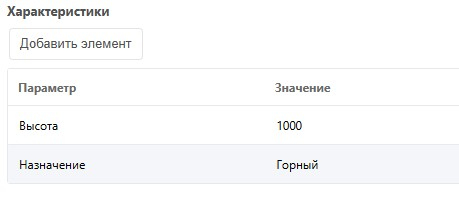
Slider for “Height”:
migx_chars_Height:slider:title|valueCheckboxes for “Purpose”:
migx_chars_Purpose:title|valueIn sf_index_fields, always without filter type:
migx_chars_Purpose:title|value,migx_chars_Height:title|value&where parameter
Supports one parameter/value. Works only with resource and MiniShop3 product tables (field names as in the database, no prefixes).
| Description | Example |
|---|---|
| New items only | 'where' => '{"new":"1"}' |
| Products with price > 2000 | 'where' => '{"price:>":"2000"}' |
| Resources with "sale" in longtitle | 'where' => '{"longtitle:like":"sale"}' |
Templating
Default chunks use Fenom (requires pdoTools); standard syntax is also supported.
Use custom chunks per filter with &tplFilter_field and &tplFilterRow_field.
Example for ms_tags:
&tplFilter_ms_tags=`block_chunk`
&tplFilterRow_ms_tags=`row_chunk`
If an alias is set, use the alias name:
&aliases=`ms_tags==tag`
&tplFilter_tag=`block_chunk`
&tplFilterRow_tag=`row_chunk`
Block titles use lexicon keys sf_filter_filter_name (or the plugin).
JavaScript
To submit the form use sf.submit:
js
sf.submit();After data refresh the sfilters event fires:
js
document.addEventListener('sfilters', (e) => {
    // console.log(e);
});
System events
All events receive an array $data.
| Event | Description |
|---|---|
| sfOnGetIds | Fired after initial collection of displayed resource IDs. You can add a resource by ID or replace the whole set. |
| sfOnGetFilterValues | Fired after filter values are built. Receives array of values (e.g. to sort), filter name and type. |
| sfOnBeforeCreateFilterRow | Fired when a filter row is created. You can change labels, values, etc. |
| sfOnBeforeCreateFilter | Fired when a filter block is created. You can change block title, slider range, etc. |
| sfOnCheckResource | Fired when checking a resource against a selected filter value. Receives resource id, filter name, value. To include the resource, set $data['result'] = true; |
See core/components/simplefilters/docs/pluginExamples.md for event examples.