


miniShop2
Flexible and fast e-commerce component for MODX Revolution

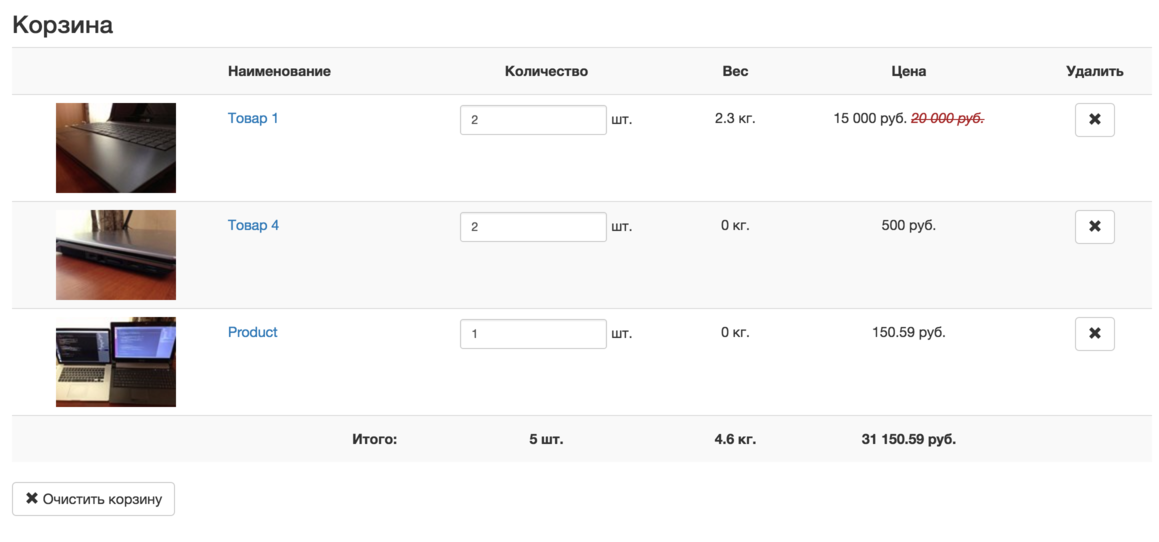
Snippet for outputting the customer cart. Use it on the cart page and on the checkout page to display and edit cart contents.
| Parameter | Default | Description |
|---|---|---|
| tpl | tpl.msCart | Chunk used for output. |
| includeTVs | Comma-separated list of TV parameters to select. E.g. "action,time" gives placeholders [[+action]] and [[+time]]. | |
| includeThumbs | Comma-separated list of thumbnail sizes to select. E.g. "120x90,360x240" gives placeholders [[+120x90]] and [[+360x240]]. Images must be generated in advance in the product gallery. | |
| toPlaceholder | If not empty, the snippet saves all data to a placeholder with this name instead of outputting to the page. | |
| showLog | false | Show extra information about snippet execution. Only for users authorized in context "mgr". |
The snippet outputs cart contents and totals. In your chunk you can change quantities or remove items using the product key and your form actions; the cart is updated when the form is submitted.
Подсказка
You can also use other general pdoTools parameters.
The snippet is designed to work with a Fenom chunk. It passes 2 variables into it:
You can see all product and total placeholders by passing an empty chunk:
<pre>[[!msCart?tpl=``]]</pre>Array
(
[total] => Array
(
[count] => 4
[weight] => 0
[cost] => 2 100
[discount] => 0
)
[products] => Array
(
[0] => Array
(
[id] => 4
[type] => document
[contentType] => text/html
[pagetitle] => Product 1
[longtitle] =>
[description] =>
[alias] => product-1
[alias_visible] => 1
[link_attributes] =>
[published] => 1
[pub_date] => 0
[unpub_date] => 0
[parent] => 3
[isfolder] => 0
[introtext] =>
[richtext] => 1
[template] => 1
[menuindex] => 0
[searchable] => 1
[cacheable] => 1
[createdby] => 1
[createdon] => 1699161918
[editedby] => 0
[editedon] => 0
[deleted] => 0
[deletedon] => 0
[deletedby] => 0
[publishedon] => 1699161918
[publishedby] => 1
[menutitle] =>
[donthit] => 0
[privateweb] => 0
[privatemgr] => 0
[content_dispo] => 0
[hidemenu] => 0
[class_key] => msProduct
[context_key] => web
[content_type] => 1
[uri] =>
[uri_override] => 0
[hide_children_in_tree] => 0
[show_in_tree] => 0
[properties] =>
[article] =>
[price] => 500
[old_price] => 0
[weight] => 0
[image] =>
[thumb] =>
[vendor] => 0
[made_in] =>
[new] => 0
[popular] => 0
[favorite] => 0
[tags] =>
[color] =>
[size] =>
[source] => 2
[vendor.name] =>
[vendor.resource] =>
[vendor.country] =>
[vendor.logo] =>
[vendor.address] =>
[vendor.phone] =>
[vendor.fax] =>
[vendor.email] =>
[vendor.description] =>
[vendor.properties] =>
[vendor.rank] =>
[key] => ms71f884312767d1249c9093a3aad9b168
[count] => 3
[cost] => 1 500
[discount_price] => 0
[discount_cost] => 0
)
[1] => Array
(
[id] => 5
[type] => document
[contentType] => text/html
[pagetitle] => Product 2
[longtitle] =>
[description] =>
[alias] => product-1
[alias_visible] => 1
[link_attributes] =>
[published] => 1
[pub_date] => 0
[unpub_date] => 0
[parent] => 3
[isfolder] => 0
[introtext] =>
[richtext] => 1
[template] => 1
[menuindex] => 0
[searchable] => 1
[cacheable] => 1
[createdby] => 1
[createdon] => 1699161930
[editedby] => 1
[editedon] => 1699161941
[deleted] => 0
[deletedon] => 0
[deletedby] => 0
[publishedon] => 1699161900
[publishedby] => 1
[menutitle] =>
[donthit] => 0
[privateweb] => 0
[privatemgr] => 0
[content_dispo] => 0
[hidemenu] => 0
[class_key] => msProduct
[context_key] => web
[content_type] => 1
[uri] =>
[uri_override] => 0
[hide_children_in_tree] => 0
[show_in_tree] => 0
[properties] =>
[article] =>
[price] => 600
[old_price] => 0
[weight] => 0
[image] =>
[thumb] =>
[vendor] => 0
[made_in] =>
[new] => 0
[popular] => 1
[favorite] => 0
[tags] =>
[color] =>
[size] =>
[source] => 2
[vendor.name] =>
[vendor.resource] =>
[vendor.country] =>
[vendor.logo] =>
[vendor.address] =>
[vendor.phone] =>
[vendor.fax] =>
[vendor.email] =>
[vendor.description] =>
[vendor.properties] =>
[vendor.rank] =>
[key] => msb2f01124a10b7f46a6b4e58e999a69bc
[count] => 1
[cost] => 600
[discount_price] => 0
[discount_cost] => 0
)
)
[scriptProperties] => Array
(
[tpl] =>
[includeTVs] =>
[includeThumbs] =>
[toPlaceholder] =>
[showLog] =>
)
)For debugging you can also use the print modifier. Create a chunk TestCart and put in it:
{$total | print}
{foreach $products as $product}
  {$product | print}
{/foreach}
Then call it on the cart page:
[[!msCart?
  &tpl=`TestCart`
]]
You will see all available placeholders.
This snippet is intended to be used together with others on the checkout page:
[[!msCart]] <!-- View and edit cart; hidden after order is created -->

[[!msOrder]] <!-- Checkout form; hidden after order is created -->

[[!msGetOrder]] <!-- Order info; shown after order is created -->