



Description
Purpose
The component is for creating site sections and blocks such as:
- reviews;
- comments;
- user questions.
A key feature is the user rating mechanism (1 to 5, configurable), used to compute rating with two algorithms (simple average and Wilson score).
The Wilson rating is the lower bound of the Wilson score confidence interval for a Bernoulli parameter (description). This algorithm avoids rating issues when there are few votes.
easyComm works with both unauthenticated (guest) and authenticated users.
How the component works
- A user submits a comment/review/question (e.g. about a product) via a form.
- The site admin gets an email notification and manages messages in the manager (publish, delete, edit, reply).
- If the user provided an email, they receive notifications.
- If the Rating field is used, the rating is recalculated after a message is published.
- You can enable voting on each message so users can mark usefulness.
Подсказка
The component works with unauthenticated users and is not social-oriented. It was not designed as a blog or social-network comment module (though you can try it at your own risk).
easyComm is aimed at communication with e‑commerce customers and visitors of service-company sites.
Features
- Arbitrary message threads. Messages are bound to threads, and threads to a resource, so you can have several threads on one page (e.g. Reviews and Questions).
- Full management of messages and threads in the manager. The component adds an Applications menu item for creating/editing/deleting threads and messages.
- "Messages" tab on the resource page. Same as above but limited to messages and threads for the current resource.
- Email notifications. Admin is notified of new messages; if the user left an email, they get notified that the message was received and when it is published.
- Ratings. Users can rate items; the component computes overall rating with two algorithms.
- Custom fields. If the default message fields (Date, Username, Email, Contacts, Rating, Subject, Message text, Reply author, Reply text) are not enough, the plugin system lets you add custom fields.
- Multiple rating fields. Besides the single
ratingfield, you can add more rating (star) fields; averages are computed for them too. - Appearance customization. Frontend appearance is controlled via your own chunks; in the manager you can change grid columns and message edit fields.
- Gravatar support. The ecMessages snippet supports Gravatar; if a message has an email, the
gravatarplaceholder is available in the output chunk. - Detailed rating output. The ecThreadRating snippet can show detailed vote info. The package includes chunk
tpl.ecThreadDetailedRatingfor this.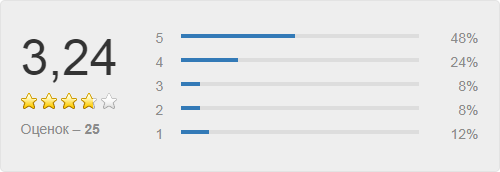
- Message voting. Like/Dislike voting per message for both authenticated users and guests.
- Default rating range is 1–5, but you can change it (e.g. 1–10) via a setting and by updating the HTML and CSS.
Dependencies
For correct operation you must install:
- pdoTools (chunks use the Fenom parser from pdoTools);
- optionally, snippet dateAgo in the message output chunk for “human” dates.
Информация
Older versions (before 1.11.4-pl) required jQuery and jquery.form on the frontend.
Example workflow
Add message form
Use snippet [[!ecForm]] to show the form on the site (e.g. on a product page). The screenshot shows the default fields; you can keep only the ones you need.
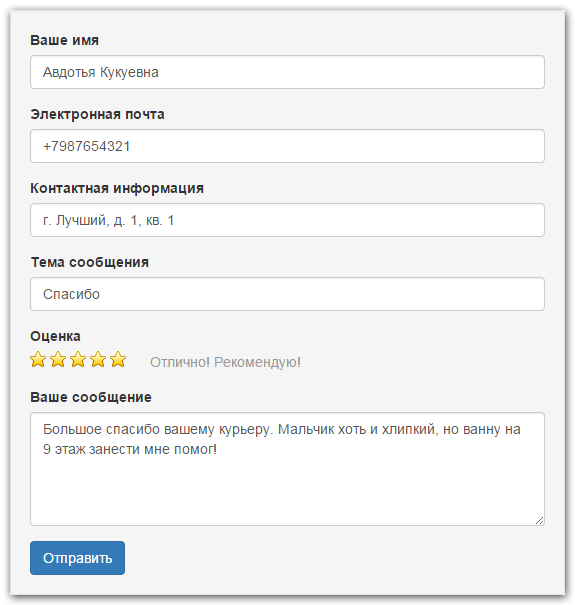
When the user submits the form, the message is saved with status "unpublished" (auto-publish is available via [[!ecForm]] parameters). The manager receives an email. If the user left an email, they get a notification that the message was received and is pending moderation.
In the manager the admin can publish messages, reply, or delete. When editing, the "notify on reply" option sends the user an email when the message is published. Possible flows: publish without reply; publish and reply; do not publish but reply.
Message list
Use snippet [[!ecMessages]] to output published messages.
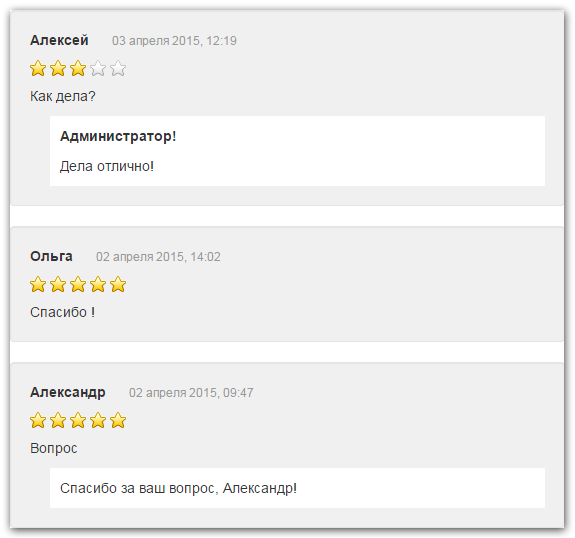
Message and Thread objects
The component uses two main objects:
- Message (ecMessage);
- Message thread (ecThread).
Because messages are bound to a thread (not directly to a resource), you can have several easyComm calls on one page, e.g. two tabs: "Product reviews" and "Product questions".
ecThread fields:
- resource — resource ID the thread belongs to
- name — unique thread name, e.g. "resource-123"
- title — thread title (for convenience), e.g. "Reviews for product 123"
- message_last — ID of the last published non-deleted message
- message_last_date — date of that message
- count — number of published non-deleted messages in the thread
- votes — vote counts (e.g. rating "1" — 3 votes), JSON
- properties — parameters passed to ecForm when the thread was created
- extended — not used in current version
- rating_simple — average rating from all messages in the thread
- rating_wilson — Wilson score
ecMessage fields:
- thread — thread ID
- subject — message subject (e.g. dropdown: "Support", "Sales")
- date — date and time
- user_name — name of the user who left the message
- user_email — email
- user_contacts — contact info
- text — message text
- reply_author — reply author
- reply_text — reply text
- notify — notify user on reply
- notify_date — last notification date (to avoid duplicate notifications)
- ip — IP address
- rating — rating
- votes — total votes (likes + dislikes)
- dislikes — number of "Dislike" votes
- votes_rating — message vote rating
- extended — not used in current version
Message also has: createdon, createdby, editedon, editedby, published, publishedon, publishedby, deleted, deletedon, deletedby.