



Utilities: Grid columns
Column setup for MiniShop3 manager tables.
Purpose
Cookbook
Badge column in orders and inline editing: Grid columns cookbook.
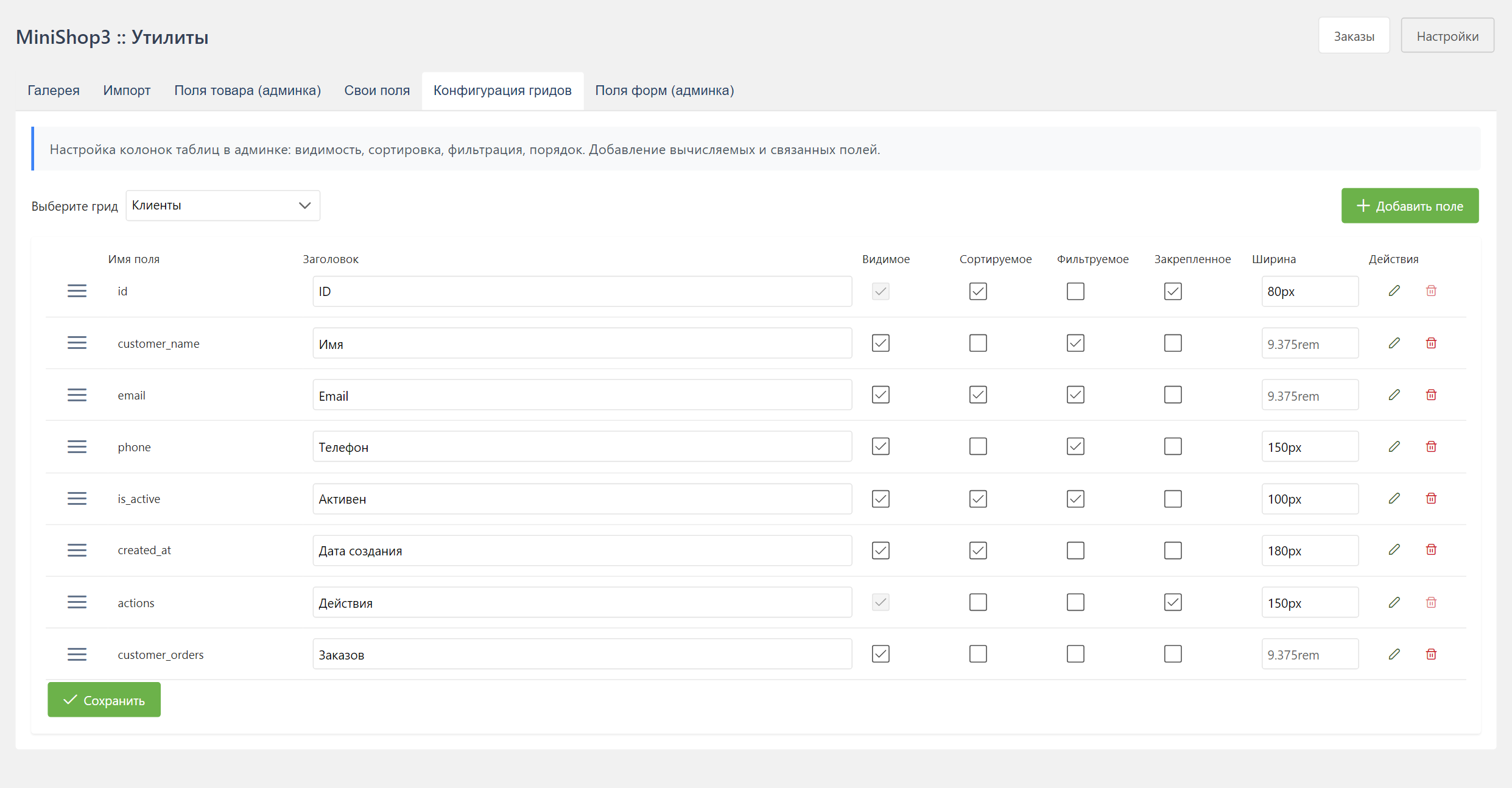
- Turn columns on and off
- Change column order
- Configure sorting and filtering
- Set column width
- Add your own columns
- Configure inline editing (for the
category-productsgrid)
Since version 1.7.0
The system setting ms3_category_grid_fields was removed. Category product table columns are configured only in this screen.
Available grids
| Grid | Description |
|---|---|
customers | Customer list |
orders | Order list |
category-products | Products in a category |
order_products | Products in an order |
vendors | Vendor list |
Interface
Grid selection
At the top of the page, pick a grid from the list.
Actions
- Drag changes column order
- Edit opens the dialog when you click a row
- Add creates a new column
Column parameters
Basic
| Parameter | Description |
|---|---|
| Field name | Model field name or alias |
| Label | Column header |
| Visible | Show the column |
| Sortable | Allow sorting on click |
| Filterable | Show the filter field |
| Frozen | Keep the column fixed while scrolling |
Sizes
| Parameter | Description |
|---|---|
| Width | Width in pixels or % |
| Min. width | Minimum width while resizing |
Column type
| Type | Description |
|---|---|
model | Field from the data model |
template | Template column (HTML) |
relation | Data from a related table |
badge | Colored label (source_field, color_field) |
option | Product option value (category-products grid) |
computed | Computed value |
image | Image |
boolean | Yes or no flag |
price | Money value (displayConfig: currency, decimals) |
weight | Weight (displayConfig: unit, decimals) |
datetime | Date and time (displayConfig: format) |
actions | Actions column |
Column types
Model field (model)
A plain column: the field value.
text
Type: model
Field name: email
Label: Email
Template (template)
A column with an HTML template.
text
Type: template
Template: <a href="mailto:{email}">{email}</a>
Available variables are fields of the current row, wrapped in curly braces.
Colored label (badge)
A colored label. The text and the HEX color come from other fields of the same row. In the orders grid, column order_status takes the caption from status_name and the color from status_color.
text
Type: badge
source_field: status_name
color_field: status_color
Product option (option)
An option column in the category-products grid. Set option.key (the option key from msOption).
text
Type: option
option.key: color
Relation (relation)
Data from a related table.
Relation parameters:
| Parameter | Description |
|---|---|
| Table | Related table name |
| Foreign key | Field used for the link |
| Display field | Field to show |
| Aggregation | COUNT, SUM, AVG, MIN, MAX |
Example, customer order count:
text
Type: relation
Table: msOrder
Foreign key: customer_id
Aggregation: COUNT
Computed value (computed)
The server computes the value. The JSON config must include computed.className (the class implements ComputedFieldInterface):
json
{
  "type": "computed",
  "computed": {
    "className": "MyComponent\\Columns\\TotalSpentColumn"
  }
}
Image (image)
An image thumbnail.
text
Type: image
Field name: image
Flag (boolean)
A flag with an icon.
text
Type: boolean
Field name: active
Price (price)
A numeric field shown as a price. Parameters live in the displayConfig JSON:
| Key | Description |
|---|---|
decimals | Digits after the decimal mark |
currency | Currency symbol |
currency_position | before or after |
thousands_separator | Thousands separator |
decimal_separator | Decimal separator (default comes from the price setting) |
text
Type: price
Field name: price
displayConfig: {"decimals":2,"currency":"₽","currency_position":"after","thousands_separator":" "}
Weight (weight)
Weight is shown with a unit:
text
Type: weight
Field name: weight
displayConfig: {"decimals":2,"unit":"kg","unit_position":"after"}
Date and time (datetime)
text
Type: datetime
Field name: createdon
displayConfig: {"format":"dd.MM.yyyy HH:mm"}
The format is a PrimeVue date formatter template (dd, MM, yyyy, HH, mm).
Actions (actions)
A column of action buttons. Built-in handlers and your own.
Action configuration:
json
[
  {
    "name": "edit",
    "handler": "edit",
    "icon": "pi-pencil",
    "label": "Edit",
    "severity": null
  },
  {
    "name": "delete",
    "handler": "delete",
    "icon": "pi-trash",
    "label": "Delete",
    "severity": "danger",
    "confirm": true,
    "confirmMessage": "Are you sure you want to delete this record?"
  }
]
Action parameters:
| Parameter | Type | Description |
|---|---|---|
name | string | Unique action name |
handler | string | Handler name from the registry |
icon | string | Full PrimeIcons class, for example pi-pencil |
label | string | Tooltip text or a lexicon key |
severity | string | Button style: danger, success, secondary, info, warn |
confirm | boolean | Ask for confirmation |
confirmMessage | string | Confirmation text |
visible | boolean | Button visibility |
disabled | boolean/function | Disable the button |
disabledField | string | Row field checked for the disabled state |
Built-in handlers:
| Handler | Description |
|---|---|
edit | Open the record for editing |
delete | Delete the record |
view | View the record |
addresses | Manage addresses (customers) |
refresh | Refresh the grid |
Configuration examples
Add a "Total orders" column
- Click Add column
- Fill in:
- Name:
total_spent - Label:
Total orders - Type:
relation - Table:
msOrder - Foreign key:
customer_id - Display field:
cost - Aggregation:
SUM
- Name:
- Save
A link in the email column
- Find the
emailcolumn. - Change its type to
template. - Set the template:
<a href="mailto:{email}">{email}</a>. - Save.
API endpoints
Get grid configuration
http
GET /api/mgr/grid-config/{grid_name}Response:
json
{
  "success": true,
  "data": {
    "columns": [
      {
        "name": "id",
        "label": "ID",
        "visible": true,
        "sortable": true,
        "filterable": false,
        "frozen": true,
        "width": 60,
        "type": "model"
      }
    ],
    "direct_filter_keys": ["query", "status_id"],
    "editor_references": []
  }
}
editor_references is filled only for grid_key=category-products.
Save configuration
http
PUT /api/mgr/grid-config/{grid_key}Request body:
json
{
  "fields": [
    {
      "name": "id",
      "label": "ID",
      "visible": true,
      "sortable": true,
      "filterable": false,
      "frozen": true,
      "width": 60,
      "type": "model"
    }
  ]
}
Permissions
GET /api/mgr/grid-config/{grid_key} requires view_document. Writes (PUT, POST, column DELETE) require mssetting_save.
Delete a column
http
DELETE /api/mgr/grid-config/{grid_key}/{field_name}System columns (is_system) cannot be deleted.
System columns
System columns are limited:
- You cannot delete them
- You cannot change the field name
- You can only hide them
Usually that is id and the actions column.
Custom actions
The global registry MS3ActionRegistry adds your own buttons to the actions column.
Action registry
The registry is window.MS3ActionRegistry:
- register action handlers
- attach hooks before and after existing actions
- override built-in handlers
Registry API
register(name, handler, options)
Registers an action handler.
Parameters:
| Parameter | Type | Description |
|---|---|---|
name | string | Action name |
handler | function | Handler (data, context) => void |
options.override | boolean | Allow replacing an existing handler |
Handler arguments:
datais the grid rowcontextis the runtime context:gridIdis the grid identifieremit(event, data)sends an eventrefresh()refreshes the gridtoastis the PrimeVue notification serviceconfirmis the PrimeVue confirmation service_(key)is the localization function
registerBeforeHook(actionName, hook)
Registers a hook that runs before the action.
javascript
MS3ActionRegistry.registerBeforeHook('delete', (data, context) => {
  // Return false to cancel the action
  if (data.is_system) {
    context.toast.add({
      severity: 'warn',
      summary: 'Not allowed',
      detail: 'Cannot delete a system record'
    })
    return false
  }
  return true
})
registerAfterHook(actionName, hook)
Registers a hook that runs after the action.
javascript
MS3ActionRegistry.registerAfterHook('delete', (data, context, result) => {
  console.log('Record deleted:', data.id)
  // Send analytics, write a log, and so on
})
Other methods
| Method | Description |
|---|---|
has(name) | Check that a handler exists |
get(name) | Get the handler |
unregister(name) | Remove a handler (built-in handlers stay) |
getRegisteredActions() | List every registered action |
execute(name, data, context) | Run an action from code |
Custom action examples
Example 1: Block a customer
Step 1. Register the handler (in a MODX plugin or your own JS):
javascript
// File: assets/components/mycomponent/js/customer-actions.js

document.addEventListener('DOMContentLoaded', () => {
  // Wait until the registry is loaded
  if (!window.MS3ActionRegistry) {
    console.error('MS3ActionRegistry not available')
    return
  }

  // Register the Block action
  MS3ActionRegistry.register('blockCustomer', async (data, context) => {
    try {
      const response = await fetch('/assets/components/minishop3/connector.php', {
        method: 'POST',
        headers: { 'Content-Type': 'application/x-www-form-urlencoded' },
        body: new URLSearchParams({
          action: 'MyComponent\\Processors\\Customer\\Block',
          id: data.id,
          HTTP_MODAUTH: MODx.siteId
        })
      })

      const result = await response.json()

      if (result.success) {
        context.toast.add({
          severity: 'success',
          summary: 'Done',
          detail: `Customer ${data.email} is blocked`,
          life: 3000
        })
        context.refresh() // Refresh the grid
      } else {
        throw new Error(result.message)
      }
    } catch (error) {
      context.toast.add({
        severity: 'error',
        summary: 'Error',
        detail: error.message,
        life: 5000
      })
    }
  })

  // Register the Unblock action
  MS3ActionRegistry.register('unblockCustomer', async (data, context) => {
    const response = await fetch('/assets/components/minishop3/connector.php', {
      method: 'POST',
      headers: { 'Content-Type': 'application/x-www-form-urlencoded' },
      body: new URLSearchParams({
        action: 'MyComponent\\Processors\\Customer\\Unblock',
        id: data.id,
        HTTP_MODAUTH: MODx.siteId
      })
    })

    const result = await response.json()
    if (result.success) {
      context.toast.add({
        severity: 'success',
        summary: 'Customer unblocked',
        life: 3000
      })
      context.refresh()
    }
  })
})
Step 2. Load the script with a MODX plugin:
php
<?php
// Plugin: MyCustomerActions
// Events: OnManagerPageBeforeRender

if ($modx->event->name !== 'OnManagerPageBeforeRender') return;

// Customers page only
$controller = $modx->controller ?? null;
if (!$controller || strpos(get_class($controller), 'Customers') === false) return;

$modx->regClientStartupScript(
    MODX_ASSETS_URL . 'components/mycomponent/js/customer-actions.js'
);
Step 3. Configure the actions column in the UI:
- Open Utilities → Grid columns
- Select the
customersgrid - Find the
actionscolumn and open the editor - Add an action:
- Name:
blockCustomer - Handler:
blockCustomer - Icon:
pi-ban - Style:
danger - Confirmation: Yes
- Message:
Block customer {email}?
- Name:
Example 2: Duplicate a product
MiniShop3 has no duplicate processor of its own. Call the MODX core processor resource/duplicate (msProduct extends a resource):
javascript
MS3ActionRegistry.register('duplicateProduct', async (data, context) => {
  const response = await fetch('/assets/components/minishop3/connector.php', {
    method: 'POST',
    headers: { 'Content-Type': 'application/x-www-form-urlencoded' },
    body: new URLSearchParams({
      action: 'resource/duplicate',
      id: data.id,
      HTTP_MODAUTH: MODx.siteId
    })
  })

  const result = await response.json()

  if (result.success) {
    context.toast.add({
      severity: 'success',
      summary: 'Product copied',
      detail: `Created product ID: ${result.object.id}`,
      life: 3000
    })
    context.refresh()
  }
})
Action configuration:
json
{
  "name": "duplicate",
  "handler": "duplicateProduct",
  "icon": "pi-copy",
  "label": "Copy",
  "severity": "secondary",
  "confirm": false
}
Example 3: Send a notification
There is no built-in processor that sends a notification. REST routes /api/mgr/notifications only serve configuration CRUD. For a Send button, implement your own endpoint (call NotificationManager or StatusChangedNotification inside it) and call that endpoint from the handler:
javascript
MS3ActionRegistry.register('sendNotification', async (data, context) => {
  const response = await fetch('/assets/components/mycomponent/notify.php', {
    method: 'POST',
    headers: { 'Content-Type': 'application/json' },
    body: JSON.stringify({ customer_id: data.id })
  })

  const result = await response.json()

  if (result.success) {
    context.toast.add({
      severity: 'success',
      summary: 'Notification sent',
      detail: `Email: ${data.email}`,
      life: 3000
    })
  }
})
Example 4: Conditional button visibility
The row field disabledField turns the button off:
javascript
// In the column configuration
{
  "name": "unblock",
  "handler": "unblockCustomer",
  "icon": "pi-unlock",
  "label": "Unblock",
  "severity": "success",
  // Inactive when the customer is not blocked
  "disabledField": "active"  // disabled when active = true
}
Hooks for built-in actions
The built-in edit and delete go through the registry too, so the same hooks apply to them.
Logging deletes:
javascript
MS3ActionRegistry.registerAfterHook('delete', async (data, context, result) => {
  // Send to the audit system
  await fetch('/api/audit/log', {
    method: 'POST',
    headers: { 'Content-Type': 'application/json' },
    body: JSON.stringify({
      action: 'delete',
      entity: context.gridId,
      entityId: data.id,
      user: MODx.user?.id,
      timestamp: new Date().toISOString()
    })
  })
})
Preventing a delete:
javascript
MS3ActionRegistry.registerBeforeHook('delete', (data, context) => {
  // Do not let paid orders be deleted
  if (context.gridId === 'orders' && data.status === 2) {
    context.toast.add({
      severity: 'error',
      summary: 'Forbidden',
      detail: 'A paid order cannot be deleted',
      life: 5000
    })
    return false // Cancel the action
  }
  return true // Continue
})
Available icons
Icons are PrimeIcons: pi-pencil, pi-trash, pi-eye, pi-copy, pi-download, pi-send, pi-lock, pi-unlock, pi-ban, pi-check, pi-times, pi-refresh, pi-cog.