



Scheduler integration
MiniShop3 runs background tasks through the Scheduler component.
Requirements
Scheduler 1.8.0 or higher. On older versions the installer registers the token and draft cleanups as one-off tasks — no interval and no first run — so they never execute until a run is scheduled by hand through «Schedule run». For ms3_csv_import and ms3_send_notification nothing changes: they are one-off anyway and are queued from code.
Enabling integration
- Install the Scheduler component and configure cron for it — see Installation and run setup.
- Enable the
ms3_use_schedulersetting: System → System Settings → minishop3.
The setting only governs notifications
ms3_use_scheduler is read in a single place — when deciding whether to send a notification right away or queue it. It does not affect the other tasks:
- notifications go to the background only with the setting on and Scheduler installed;
- import is queued by a switch in the import form, regardless of the setting;
- token and draft cleanup runs on schedule; the setting neither enables nor disables it. The tasks are registered by the MiniShop3 installer, and only when Scheduler is already in place: otherwise the resolver exits silently and no schedule appears. If Scheduler came second, upgrade MiniShop3 again or create the tasks by hand.
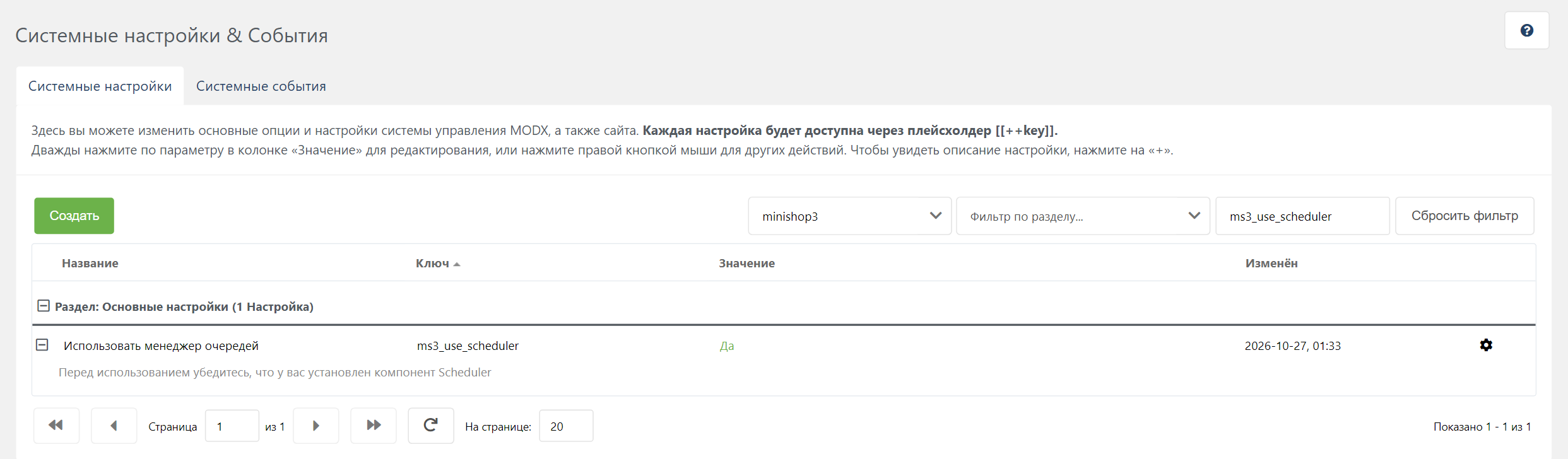 In code the setting is changed through the
 modSystemSetting object:
php
$setting = $modx->getObject(\MODX\Revolution\modSystemSetting::class, 'ms3_use_scheduler');
$setting->set('value', 1);
$setting->save();
setOption() does not save the setting
$modx->setOption('ms3_use_scheduler', true) changes the value only in memory for the current request — nothing reaches the database. Scheduler tasks run in a separate cron process and will never see such a value.
Built-in tasks
MiniShop3 registers four tasks on install:
| Task | Type | Interval | File |
|---|---|---|---|
ms3_cleanup_tokens | recurring | +1 week | elements/tasks/cleanupTokens.php |
ms3_cleanup_drafts | recurring | +1 day | elements/tasks/cleanupDrafts.php |
ms3_csv_import | one-time | — | elements/tasks/csvImport.php |
ms3_send_notification | one-time | — | elements/tasks/sendNotification.php |
The interval is a string for the PHP strtotime() function, stored verbatim in the task's interval field. After a successful run Scheduler passes it to strtotime() and schedules the next one. If the string does not parse or resolves to a time in the past, Invalid interval lands in the MODX Error Log and the recurring task is never scheduled again.
ms3_cleanup_tokens
Removes expired rows from the customer auth token table ms3_customer_tokens.
ms3_cleanup_drafts
Deletes orders with "Draft" status older than the period set in ms3_delete_drafts_after.
The period is any string PHP strtotime() understands: -1 day, -2 weeks, -1 month, -1 year. An empty value — the shipped default — disables auto-deletion.
php
$setting = $modx->getObject(\MODX\Revolution\modSystemSetting::class, 'ms3_delete_drafts_after');
$setting->set('value', '-2 weeks');
$setting->save();
ms3_csv_import
Imports products from CSV. The mode is a human decision: the import form carries a "synchronous or background" switch, and the background mode queues the task in Scheduler.
The installer registers the task with namespace minishop3 and path elements/tasks/csvImport.php. The import processor looks it up as getTask('MiniShop3', 'ms3_csv_import'), with a different case. On a typical MySQL database the strings compare without regard to letter case, so the task is found and there is no duplicate. A second task appears in another situation: Scheduler was installed after MiniShop3, the installer task does not exist at all, and the processor creates its own, already with namespace MiniShop3. The mismatch is tracked in a known issue.
The ms3_import_sync_limit setting (300 rows by default) sets the threshold. When the file has more rows, the form shows the mode switch, and without Scheduler installed it shows a warning that the file is too large for a synchronous pass. The setting itself does not pick the mode. Until the switch is set, the import is not queued.
Script properties:
php
$scriptProperties = [
    'file' => 'path/to/file.csv',  // Path relative to MODX_BASE_PATH
    'mapping' => [...],            // Columns mapped to product fields
    'fields' => [...],             // Previous mapping format, kept for compatibility
    'update' => false,             // Update existing products
    'key' => 'article',            // Field used to find an existing product
    'delimiter' => ';',            // Column delimiter
    'skip_header' => false,        // Skip the first row
    'debug' => false,              // Verbose log instead of writing to the database
    'import_id' => 'import_...',   // Run identifier, set by the processor
];
ms3_send_notification
Sends notifications without blocking the main request. Useful for slow channels — Telegram, for one.
A notification is queued when both conditions hold: the ms3_use_scheduler setting is on and the scheduler service is registered. Otherwise it is sent right away, in the same request. The delay comes from the notification's own settings (the "Delay" field for a status and recipient type); with a zero delay the run is scheduled at +1 second.
Script properties:
php
$scriptProperties = [
    'notification_class' => 'MiniShop3\Notifications\Order\StatusChangedNotification',
    'order_id' => 123,
    'channel' => 'telegram',         // channel name: email or telegram
    'recipient_type' => 'manager',   // customer or manager
    'recipient' => [...],            // recipient data for the channel
    'notification_data' => [...],    // snapshot of the notification data
];
The task rebuilds the notification from the class name. For StatusChangedNotification it takes the status ids out of notification_data (new_status.id, old_status.id) and loads the status objects again; if the new status is missing from the database, the task writes a line into the MODX error log and returns false — but the Scheduler run is still marked successful: the run status depends only on whether the task added an error through addError(). Look for such cases in the MODX log, not in the list of runs. Draft cleanup behaves the same way.
Channels. Two are registered out of the box: email and telegram. There is also SmsChannel, but it is an abstract base: it cannot be registered as is — extend it and implement sendSms() for your provider. A custom channel is registered by a plugin on the msOnRegisterNotificationChannels event, which receives a manager parameter:
php
$manager = $modx->getOption('manager', $scriptProperties);
$manager->registerChannel(new \MyPackage\Notifications\SmsChannel($modx));
Monitoring tasks
Via manager
Extras → Scheduler — three tabs: Tasks (the registered ones), Scheduled Runs and Historic Runs.
Via API
A task has no method returning its last run — runs are read with a query against sTaskRun:
php
/** @var \Scheduler $scheduler */
$scheduler = $modx->services->get('scheduler');

$task = $scheduler->getTask('minishop3', 'ms3_cleanup_tokens');

$c = $modx->newQuery('sTaskRun');
$c->where(['task' => $task->get('id')]);
$c->sortby('executedon', 'DESC');
$c->limit(1);

/** @var \sTaskRun|null $lastRun */
$lastRun = $modx->getObject('sTaskRun', $c);

if ($lastRun) {
    echo $lastRun->get('status');          // 0 scheduled, 1 executing, 2 success, 3 failure
    echo $lastRun->get('executedon');      // run timestamp
    echo $lastRun->get('processing_time'); // duration in seconds
    echo $lastRun->get('message');         // message from the task

    if ($lastRun->hasErrors()) {
        print_r($lastRun->get('errors'));
    }
}
The codes 0–3 are sTaskRun::STATUS_SCHEDULED, STATUS_EXECUTING, STATUS_SUCCESS and STATUS_FAILURE. Status 3 is set when the run has errors (hasErrors()), including after an exception. The value returned from the task file is written to message and does not change the status by itself.
Running tasks manually
Via manager
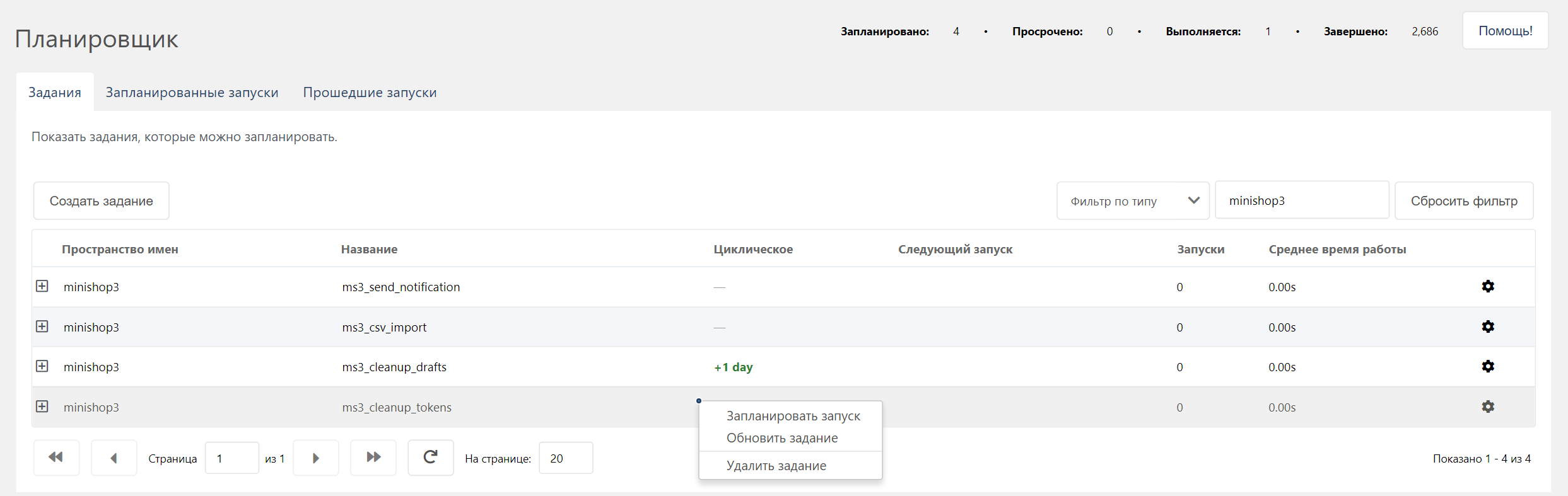
- Open Extras → Scheduler → Tasks.
- Find the task (namespace: minishop3).
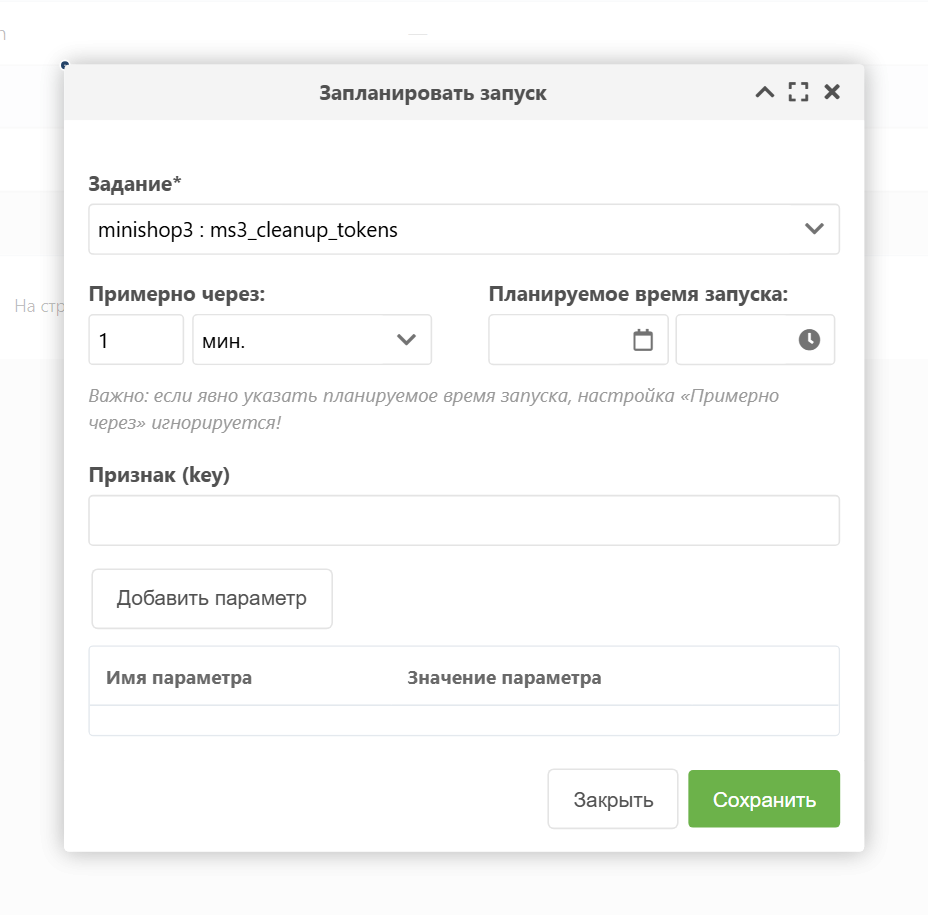
- Pick Schedule new run from the context menu.
The run goes into the queue. A single cron pass takes as many runs as the Scheduler setting scheduler.tasks_per_run allows — one by default, so with a non-empty queue a run may wait for several passes.
Via PHP
php
/** @var \Scheduler $scheduler */
$scheduler = $modx->services->get('scheduler');

// Get task
$task = $scheduler->getTask('minishop3', 'ms3_cleanup_tokens');

// Queue a run — the next cron pass picks it up
$task->schedule('+1 minute');

// Tasks that take parameters receive them as the second argument
$task->schedule('+1 minute', ['import_id' => 'import_123']);
There is no synchronous run: schedule() only queues the run, and the Scheduler cron script executes it.
Creating custom tasks
Task types, passing data and the rules for returning a result are covered in the Scheduler docs: Creating a task and Task development.
Registering a task
php
/** @var \Scheduler $scheduler */
$scheduler = $modx->services->get('scheduler');

// Create task
$task = $modx->newObject('sTask');
$task->fromArray([
    'class_key' => 'sFileTask',
    'namespace' => 'mypackage',
    'reference' => 'my_custom_task',
    'content' => 'elements/tasks/myTask.php',  // Relative to the namespace core path
    'description' => 'My custom MiniShop3 task',
    'recurring' => true,
    'interval' => '+1 hour',
]);
$task->save();

// Schedule first run
$task->schedule('+1 minute');
Task file
Scheduler loads the file through include and gives it four variables: $modx, $task, $run and $scriptProperties (data from the second argument of schedule()). The returned value becomes the run result.
php
<?php
/**
 * @var modX $modx
 * @var sFileTask $task
 * @var sTaskRun $run
 * @var array $scriptProperties
 */

// Get MiniShop3 service
$ms3 = $modx->services->get('ms3');

// Your logic
try {
    // ... run task ...

    $modx->log(modX::LOG_LEVEL_INFO, "[myTask] Completed successfully");
    return true;
} catch (\Exception $e) {
    $run->addError($e->getMessage());
    return false;
}
addError($type, array $details = []) in Scheduler: the first argument becomes the type field, and the second defaults to empty. csvImport.php passes a single message string, and that string is stored as type.
Related settings
| Setting | Default | Description |
|---|---|---|
ms3_use_scheduler | false | Send notifications through the Scheduler queue |
ms3_delete_drafts_after | empty | Draft retention period, strtotime() format |
ms3_import_sync_limit | 300 | Row count past which the import form offers the background mode |
ms3_status_draft | 1 | The status the cleanup task uses to pick drafts |
On the Scheduler side, task behaviour is shaped by scheduler.tasks_per_run, scheduler.recurring_on_failure and the failure email settings.
Troubleshooting
Tasks not running
Check:
- whether cron for Scheduler is configured — how to set it up;
- whether the web server can read the task files;
- what Scheduler writes to the MODX Error Log.
With a long queue a run waits for its pass: by default cron takes one task at a time (scheduler.tasks_per_run).
Recurring tasks not restarting
Most often the previous run ended with an error: after a failure the next run is not scheduled and stopped due to failure goes into the log. To keep the cycle going through errors, enable the Scheduler setting scheduler.recurring_on_failure — it is off by default.
What else is worth checking:
- the Scheduler version — 1.8.0 or higher is required;
- the
recurringfield in task settings; - the
intervalvalue — a string that does not parse producesInvalid intervaland stops the cycle.
Task errors
Task logs:
- MODX Error Log (
core/cache/logs/error.log); - the Historic Runs tab in Scheduler — each run shows its message and error list.
Error records live in the run's errors field: an array where every record carries type (the first argument of addError()), timestamp and the details you passed.