


ms2form
Outputs a form for creating miniShop2 products by the user from the frontend

Outputs a form for creating miniShop2 products by the user from the frontend.
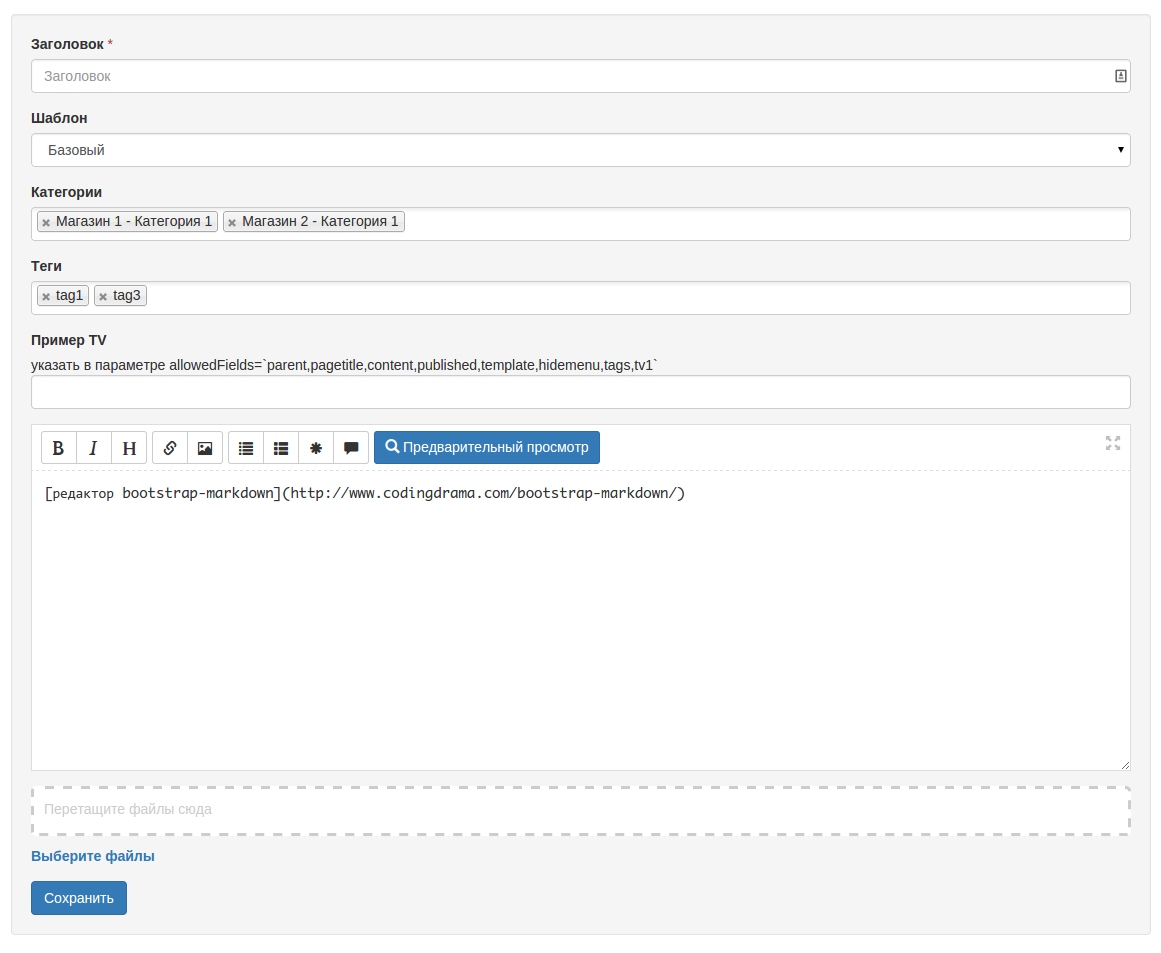
| Name | Default | Description |
|---|---|---|
| ms2form_assets_url | /assets/components/ms2form/ | URL to frontend assets |
| ms2form_core_path | {core_path}components/ms2form/ | Path to the component |
| ms2form_frontend_css | /assets/components/ms2form/css/web/ms2form.css | Path to store styles file. If you want to use custom styles, specify the path here, or clear the parameter and load them manually via the site template. |
| ms2form_frontend_js | /assets/components/ms2form/js/web/ms2form.js | Path to store scripts file. If you want to use custom scripts, specify the path here, or clear the parameter and load them manually via the site template. |
| ms2form_mail_bcc | 1 | Comma-separated list of administrator ids to receive notifications when a new resource is created. |
| ms2form_mail_createdby | Yes | Send notification to the resource creator |
| ms2form_mail_from | Sender address for email notifications. If empty, the emailsender setting will be used. | |
| ms2form_mail_from_name | Name to use as sender for all notifications. If empty, the site_name setting will be used. |
| Name | Default | Description |
|---|---|---|
| allowFiles | Yes | Allow the user to upload files to the server. |
| allowedFields | parent, pagetitle, content, published, template, hidemenu, tags | Product fields the user is allowed to fill. You can specify TV parameter names. |
| editor | quill | Content editor type. 0 – disable the editor, quill |
| parent | ID of the main category for publishing the resource. Required. | |
| parentMse2form | Allow creating new categories and use the Msearch2 form for autocomplete. JSON string with mSearchForm snippet parameters [json] | |
| parents | Comma-separated list of resource IDs to search for categories where the resource will be published together with the main category. By default all available categories from the frontend are shown, with permission check. | |
| parentsIncludeTVs | Comma-separated list of TV names to output together with extra categories | |
| parentsSortby | pagetitle | Sort field for extra categories, you can use TV |
| parentsSortdir | ASC | Sort direction for extra categories |
| resources | Comma-separated list of category IDs where the resource will be published together with the main category. Alternative to parents | |
| permissions | section_add_children | Permission check to publish in the section. By default the section_add_children permission is checked. |
| redirectPublished | new | Where to redirect the user after creating the resource? new – to the newly created one, 0 – do not redirect, id – to the resource with the specified id |
| redirectScheme | -1 | URL scheme for redirect modx.makeurl |
| requiredFields | parent, pagetitle, content | Required resource fields the user must fill to submit the form. |
| source | Media source ID for file upload. By default the source from system setting ms2_product_source_default will be used. | |
| template | Template ID for publishing the resource; this setting disables the templates setting | |
| templates | 1 | List of template IDs for publishing resources in the format 1==Base,2==Additional; you can specify only one template id; by default the template with id 1 is used |
| tags | true | Allow or disallow tag display |
| tagsNew | true | Allow or disallow adding new tags |
| tplCreate | tpl.ms2form.create | Chunk for creating a new resource |
| tplEmailBcc | tpl.ms2form.email.bcc | Chunk for notifying site administrators of a new resource. |
| tplFile | tpl.ms2form.file | Chunk for uploaded file display (non-image). |
| tplFiles | tpl.ms2form.files | Container for the uploader and list of already uploaded files. |
| tplImage | tpl.ms2form.image | Chunk for uploaded image display. |
| tplSectionRow | tpl.ms2form.section.row | Chunk for extra category row display. |
| tplTagRow | tpl.ms2form.tag.row | Chunk for tag row display. |
| tplUpdate | tpl.ms2form.update | Chunk for updating an existing resource. |
To create a new product, call the uncached snippet ms2form with the required parameters.
To edit an existing product via the form, the link to the resource with the form must include the GET parameter ?&pid=[product id].
All required permissions are in the access policy ms2formUserPolicy. Apply this policy to the user group so they can use the form.
The snippet is called uncached.
[[!ms2form?
  &parent=`54`
  &parentMse2form=`{"parents": "114"}`
  &parents=`54,58`
  &editor=`bootstrapMarkdown`
  &templates=`1==Base,2==Additional`
  &allowedFields=`parent,pagetitle,content,published,template,hidemenu,tags,tv1`
  &requiredFields=`parent,pagetitle,content`
]]
Resource properties and extra fields must be added to the allowedFields parameter and to the chunks:
<input type="hidden" name="hidemenu" value="0"/>

<div class="form-group">
  <label>[[%ms2form_pagetitle]]</label>
  <span class="text-danger">*</span>
  <input type="text" class="form-control" placeholder="[[%ms2form_pagetitle]]" name="pagetitle" value="" maxlength="50" id="ms2formPagetitle"/>
</div>

<div class="form-group">
  <label>Example TV </label>
  <br/>
  <input type="text" name="tv1" class="form-control">
</div><input type="hidden" name="hidemenu" value="0"/>
<div class="form-group">
<label>[[%ms2form_pagetitle]]</label>
<input type="text" class="form-control" placeholder="[[%ms2form_pagetitle]]" name="pagetitle" value="[[+pagetitle]]" maxlength="50" id="ms2form-pagetitle"/>
</div>
<div class="form-group">
<label>Example TV </label>
<br/>
<input type="text" value="[[+tv1]]" name="tv1" class="form-control">
</div>The appearance of extra TVs and resource fields (except template, tags, multiple categories, content editor and gallery) must be defined manually using third-party scripts or use a hidden field:
<input type="hidden" name="hidemenu" value="0"/>Report suggestions and issues with ms2Form on Github.