



Column settings
Choose which columns appear on Products, in which order and width.
How to open
On the Products tab → Table settings (columns icon).
Dialog
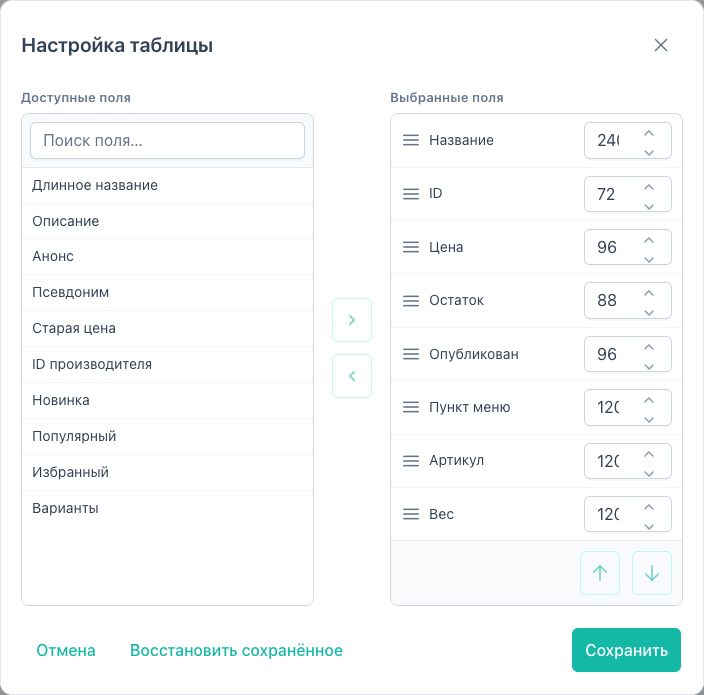
Two list panels:
| Panel | Contents |
|---|---|
| Available | Fields that can be added to the table |
| Selected | Columns visible in the grid |
Additionally:
- Search by field name in Available
- add / remove buttons for the highlighted field
- drag and drop from Available to Selected and reorder within Selected (handle left of the name)
- Up / Down: order in Selected (keyboard and buttons preserved)
- Width: pixel value (min. 40) for each selected column
In the grid, width can be changed by dragging the right edge of a column header (40–480 px). The value is saved in ui/state with other table settings.
Footer buttons
| Button | Action |
|---|---|
| Cancel | Close without saving |
| Restore | Load the snapshot from browser localStorage (msbulkeditor-columns, msbulkeditor-column-widths), not factory defaults and not server ui/state |
| Save | Persist columns and widths to ui/state/save and refresh localStorage |
Available columns
The field list comes from the fields/catalog API (mgr/fields/catalog).
| Group | Examples |
|---|---|
resource | pagetitle, published, alias |
ms3 | price, stock, article, weight |
computed | id, variant_count |
tv | msbe:tv:* when templateId is passed |
option | msbe:option:* when parent (category) is passed |
Each entry: { key, label, group, editable, inlineCapable, source? }. TVs and options include source (tv:name, option:key).
Six columns are shown by default: id, pagetitle, price, stock, published, variant_count. Other fields appear in the picker after the catalog loads.
The Preview column (thumb) is pinned on the left in the grid and is not shown in the Table settings dialog.
If the fields/catalog API is unavailable, the Available list falls back to a static front-end registry (~20 resource/ms3/computed fields). After a successful response, the catalog replaces the static list. TVs and options are added when templateId / parent are present.
Per-user persistence
When msbulkeditor_enable_save_setting_user = Yes (default), columns and widths are stored in msbe_user_states for the current manager user.
When No, the server does not store the layout. On load everyone starts from the same table. The browser still writes a copy to localStorage. Restore in the dialog reads that copy.
Limitations
- TVs and options in the picker appear after loading the catalog with
templateId/parent.
Empty states
- No available: all fields are already in Selected
- No search results: refine the query
- No selected: add at least one column before saving