


msBundles
Product bundles for miniShop3 with shared pricing, discounts, and cart sync
- MODX 3
- PHP 8.2
- miniShop3
- Vue 3

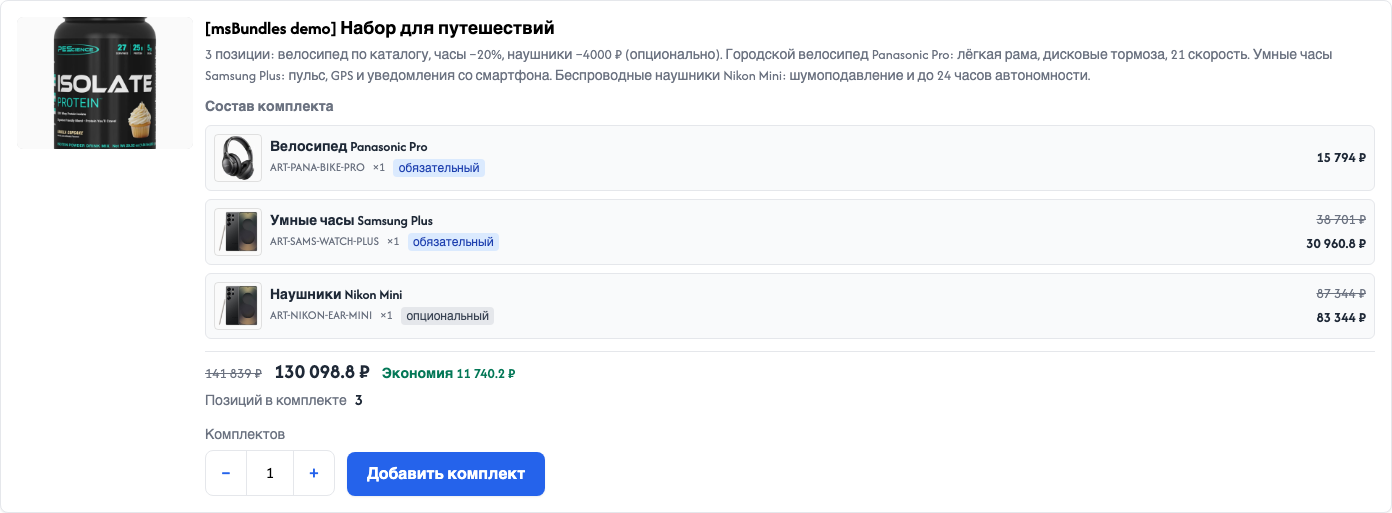
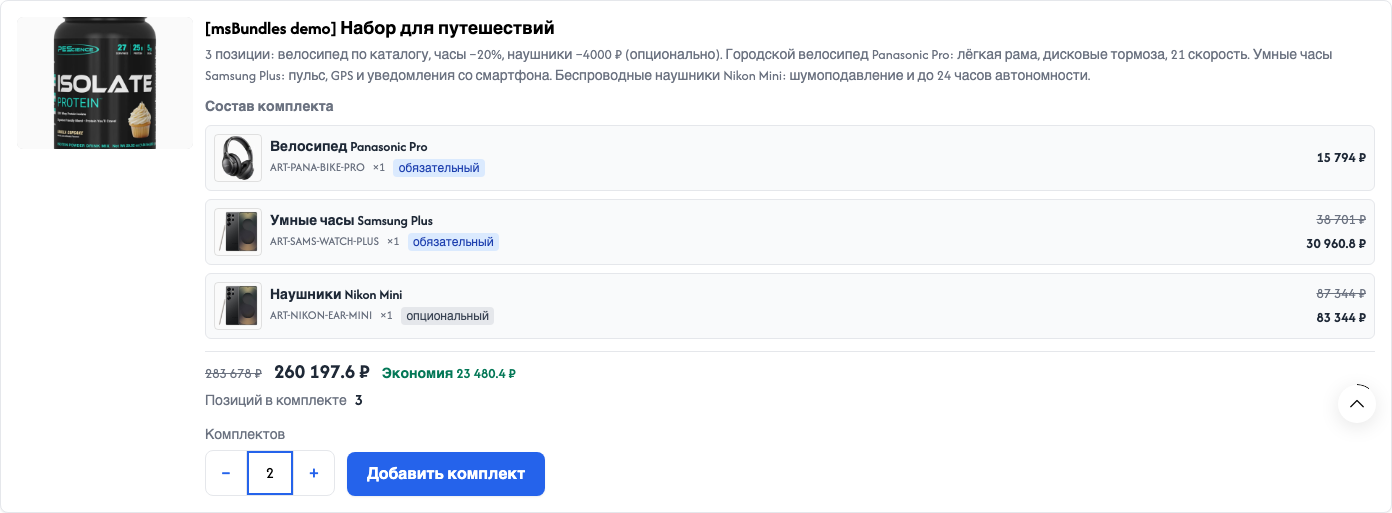
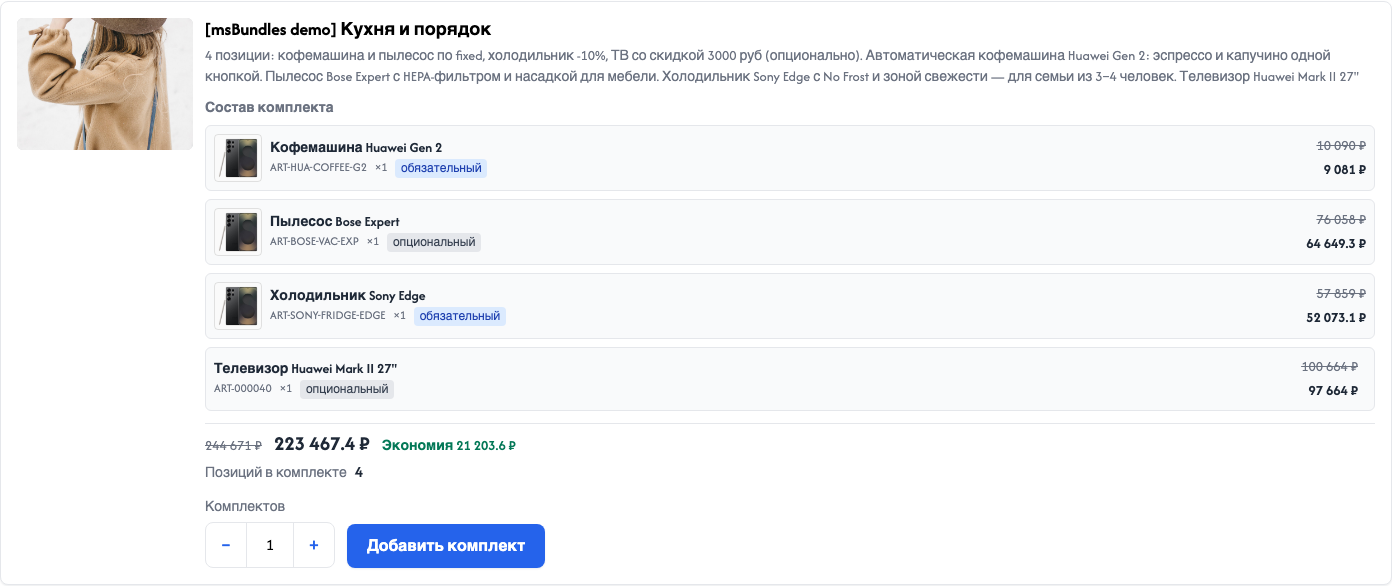
Snippet calls, chunk placeholders, CSS/JS, and how a bundle looks in the cart. Snippet parameters are also covered under Snippets.
Before diving into chunks, check two things:
<head> includes msBundles.initialize. Otherwise add buttons and styles will not work.msCart has selector. Otherwise you get a toast after add, and the on-page cart block stays stale.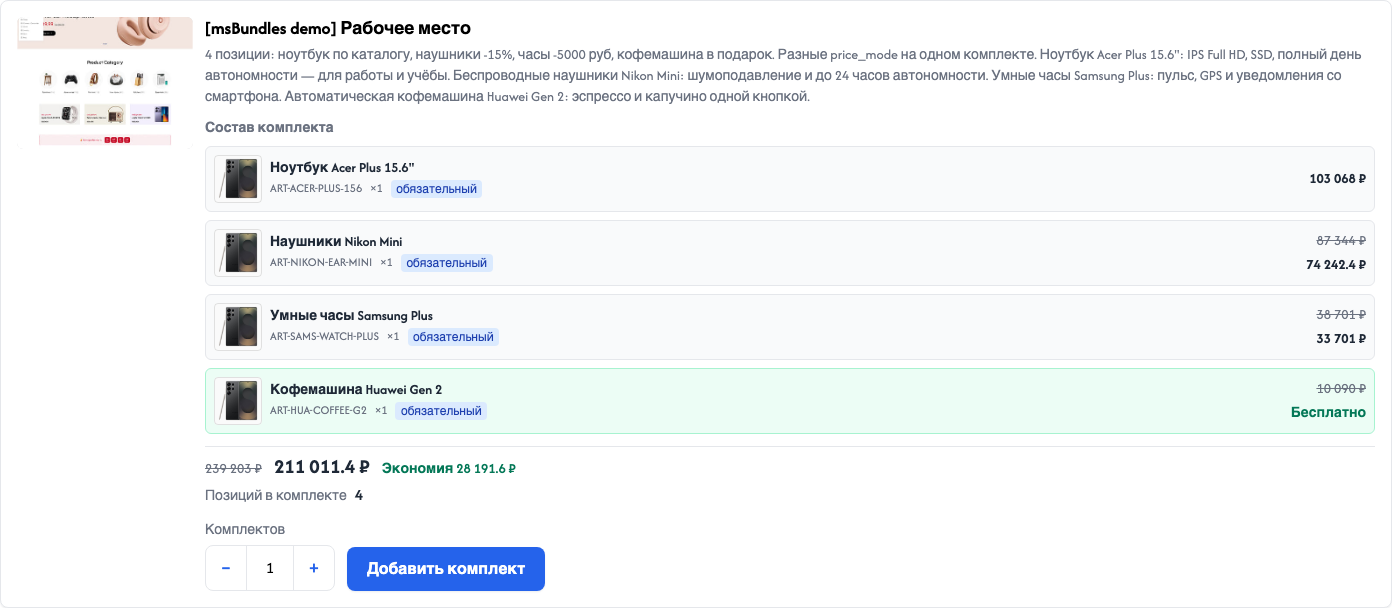
{extends 'file:templates/base.tpl'}

{block 'head'}
  {'!msBundles.initialize' | snippet}
{/block}

{block 'content'}
  <h1>{$_modx->resource.pagetitle}</h1>

  {'!msBundles' | snippet : [
    'product' => $_modx->resource.id,
    'tpl' => 'tplMsBundlesItem',
    'wrapperTpl' => 'tplMsBundlesList',
    'emptyTpl' => 'tplMsBundlesEmpty',
    'activeOnly' => true,
    'quantity' => 1
  ]}

  <section id="ms-cart" data-ms-cart aria-live="polite">
    {'!msCart' | snippet : [
      'tpl' => 'tpl.msCart',
      'return' => 'tpl',
      'selector' => '#ms-cart'
    ]}
  </section>
{/block}[[!msBundles.initialize]]
[[!msBundles?
&product=`[[*id]]`
&tpl=`tplMsBundlesItem`
&wrapperTpl=`tplMsBundlesList`
&emptyTpl=`tplMsBundlesEmpty`
&activeOnly=`1`
&quantity=`1`
]]
<div id="ms-cart" data-ms-cart aria-live="polite">
[[!msCart?
&tpl=`tpl.msCart`
&return=`tpl`
&selector=`#ms-cart`
]]
</div>In tpl.msCart, call tplMsBundlesCartInfo under the product name (see below).
The snippet, REST /bundle/*, and cart add use the current MODX context (web, en, …). A bundle with another context_key will not appear on the storefront.
bundle > 0 — one bundle by ID. Inactive with activeOnly=1 or wrong context → empty.bundles — bundles by ID list (order as in the parameter).list=all — all bundles in the current context (by sortorder).product > 0 — bundles that include the product.emptyTpl.With msbundles_stock_behavior=hide and unavailable stock, the card is omitted. block and message keep the card with --blocked / --warning modifiers.
Several cards by ID list:
{'!msBundles' | snippet : [
  'bundles' => '5,8,12',
  'wrapperTpl' => 'tplMsBundlesList',
  'tpl' => 'tplMsBundlesItem'
]}
{'!msBundles.initialize' | snippet}[[!msBundles?
&bundles=`5,8,12`
&wrapperTpl=`tplMsBundlesList`
&tpl=`tplMsBundlesItem`
]]
[[!msBundles.initialize]]All bundles in the current context:
{'!msBundles' | snippet : [
  'list' => 'all',
  'wrapperTpl' => 'tplMsBundlesList'
]}
{'!msBundles.initialize' | snippet}[[!msBundles?
&list=`all`
&wrapperTpl=`tplMsBundlesList`
]]
[[!msBundles.initialize]]Override tokens on .msbundles (or :root) so cards match the store palette:
.msbundles {
  --msbundles-color-accent: #your-brand;
  --msbundles-color-accent-hover: #your-brand-dark;
  --msbundles-color-text: #111827;
  --msbundles-color-muted: #6b7280;
  --msbundles-color-border: #e5e7eb;
  --msbundles-color-surface: #fff;
  --msbundles-radius: 0.5rem;
}| Variable | Purpose |
|---|---|
--msbundles-color-accent | Accent: product links, Add button, cart badges |
--msbundles-color-accent-hover | Hover / active for accent buttons and links |
--msbundles-color-text | Primary text on the card and composition |
--msbundles-color-muted | Secondary text: description, SKU, captions |
--msbundles-color-border | Borders for the card, composition rows, inputs |
--msbundles-color-surface | Bundle card background |
--msbundles-radius | Corner radius for the card, inputs, and buttons |
More tokens in msbundles.css: spacing (--msbundles-space-*), fonts (--msbundles-font-*), savings/free (--msbundles-color-savings, --msbundles-color-free*), warning/error (--msbundles-color-warning*, --msbundles-color-danger*), shadow and focus-ring.
tplMsBundlesItem) | Placeholder | Description |
|---|---|
id | Bundle ID |
name | Name |
description | Description |
image, image_url | Image URL |
image_html | <div class="msbundles__media">…</div> block or empty |
has_image | 0 / 1 — image present |
active | 0 / 1 — active |
quantity | Requested number of bundles |
item_count | Sum of product units in the set |
product_count | Number of lines |
products | Composition rows HTML (productTpl) |
composition_html | “Composition” section or empty |
price_html | Price, strikethrough, savings. At 0 — “Free” |
total | Total (number) |
original_total | Sum at original prices |
savings | Savings (number) |
total_formatted | Total with currency or “Free” |
original_total_formatted | Original with currency |
savings_formatted | Savings with currency |
available | 0 / 1 — can order |
stock_message | Stock error or warning |
state_modifier | msbundles__item--available / --warning / --blocked |
stock_behavior | block, message, hide |
max_bundle_quantity | Qty field limit |
tplMsBundlesList: items — card HTML. With no bundle image and imageFallback=1, the card uses the first product thumb.
tplMsBundlesProduct) The stock chunk uses {$product_id}. In a custom chunk you can mirror catalog-style attributes with id = product_id.
| Placeholder | Description |
|---|---|
product_id | Product ID |
name | Name |
name_html | Name in a link or plain text |
article | SKU |
url | Product URL |
image, image_url | Thumb or image |
image_html | <span class="msbundles__product-media">…</span> block or empty |
quantity | Units of this product in one bundle |
bundle_quantity | Requested number of bundles |
line_quantity | quantity × bundle_quantity |
required | 0 / 1 — required line |
required_label | “Required” / “Optional” |
price_mode | original, fixed, discount_percent, discount_amount, free |
is_free | 0 / 1 — line price is 0 |
unit_price | Unit price after the price mode |
unit_price_formatted | Price with currency or “Free” |
unit_price_html | <span class="msbundles__price">…</span> |
original_unit_price | Original unit price |
original_unit_price_formatted | Original with currency |
original_price_html | Strikethrough price or empty |
line_total | Line total |
line_total_formatted | Total with currency or “Free” |
Classes (msbundles__*) are for styling only. JS finds nodes by data attributes.
<article
  data-msbundles="item"
  data-ms-bundle="{$id}"
  data-ms-bundle-available="{$available}"
>
  <h3>{$name}</h3>
  <div data-msbundles="summary">
    <p data-msbundles="price">{$price_html}</p>
    <span data-msbundles="product-count">{$product_count}</span>
  </div>
  <p data-msbundles="stock" role="status">{$stock_message}</p>
  <div data-msbundles="controls">
    <button type="button" data-msbundles-action="qty-dec" data-ms-bundle="{$id}">−</button>
    <input type="number" data-bundle-quantity data-ms-bundle="{$id}" value="{$quantity}" min="1" />
    <button type="button" data-msbundles-action="qty-inc" data-ms-bundle="{$id}">+</button>
    <button type="button" data-msbundles-action="add-bundle" data-ms-bundle="{$id}">
      {'msbundles.add_bundle' | lexicon}
    </button>
  </div>
</article>
Changing qty calls calculate: [data-msbundles="price"] gets price.price_html, stock status goes to [data-msbundles="stock"].
| Attribute | Where | Purpose |
|---|---|---|
data-msbundles="list" | list wrapper | Bundle list root |
data-msbundles="item" | card | Card root |
data-ms-bundle | card / controls | Bundle ID |
data-ms-bundle-available | card | 1 / 0 after calculate |
data-ms-bundle-stock | card | available / warning / blocked |
data-msbundles="summary" | summary block | Anchor for stock message |
data-msbundles="price" | price line | HTML replaced after calculate |
data-msbundles="product-count" | line count | Meta (server render) |
data-msbundles="stock" | stock message | Errors and warnings |
data-msbundles="controls" | qty + CTA | Action group |
data-bundle-quantity | input | “Bundles” value |
data-msbundles-action="qty-dec" / qty-inc | buttons | Quantity stepper |
data-msbundles-action="add-bundle" | button | Add to cart |
data-msbundles="product" | composition row | Bundle line |
data-product-id | composition row | Product ID |
data-msbundles="product-price" | line price | Price in composition |
data-msbundles="cart-info" | cart block | Lead/member metadata |
data-bundle-hash | cart-info / cart row | Links bundle rows |
data-bundle-lead | cart-info / row | 1 = lead |
data-msbundles="name" | cart name | Name for confirm/remove |
data-msbundles-action="remove-bundle" | button | Remove bundle |
Legacy data-action with the same values is still accepted. Use data-msbundles-action in new chunks.
You can restyle msbundles__* / msbundles-cart-* in the theme. JS does not depend on those classes (except optional modifiers like --busy set by the script).
Via snippet (preferred):
{'!msBundles.initialize' | snippet}[[!msBundles.initialize]]The snippet loads msbundles.css, then scripts in order: msbundles-helpers.js → msbundles-cart.js → msbundles.js. Before scripts it outputs window.msbundlesConfig and window.msbundlesLexicon.
| Config key | Default | Purpose |
|---|---|---|
autoBind | true | Auto-bind handlers |
apiBaseUrl | '' | API prefix if Router is not on the default path |
maxBundleQuantity | from setting | Qty field limit |
calculateDebounceMs | 350 | Price recalculation debounce |
confirmRemoveBundle | false | confirm() before “Remove bundle”. Off by default, like a normal MS3 product |
Custom config before the snippet:
<script>window.msbundlesConfig = { confirmRemoveBundle: true };</script>“Remove bundle” works like the × on a normal product: ms3.cartUI.handleRemove runs, miniShop3 shows a toast, and the plugin clears the other rows of the set. A separate REST call to /bundle/remove is rare. It is used only when the main row has no product key for the normal cart remove path.
Add and remove need the ms3_token cookie.
| Event | When |
|---|---|
msbundles:before | Before calculate / add / remove |
msbundles:success | Successful add / remove |
msbundles:error | API error |
msbundles:updated | Price recalculation or successful change |
<script>
document.addEventListener('msbundles:success', function (e) {
  console.log(e.detail.action, e.detail.result);
});
</script>
After add/remove: toast via ms3.message and cart refresh via MsBundles.refreshCart().
window.MsBundles | Method | Purpose |
|---|---|
bind | Attach handlers to cards and the cart |
addBundle | POST add bundle |
removeBundle | Remove by bundle_hash when the normal cart path is unavailable |
calculate | Recalculate price and stock |
applyCalculateToCard | Update card price from a calculate response |
enhanceCartDisplay | Lead/member UI on an already rendered table |
applyCartRenderFallback | Inject HTML if MS3 did not return render |
refreshCart | GET /api/v1/cart/get with render and refresh msCart blocks |
request | Low-level API call |
events | DOM event name map |
A bundle sits in the cart as several miniShop3 rows linked by bundle_hash in options. The main row controls quantity. The other products in the set follow it. One “Remove bundle” button clears the whole set.
Without selector on msCart, the toast after add still appears, but the on-page HTML stays stale. selector registers the block in ms3Config.render.cart. After add/remove the front end calls /api/v1/cart/get with render tokens and redraws the cart.
tpl.msCart Under the product name, call tplMsBundlesCartInfo:
{if $product.options.msbundles?}
    {'tplMsBundlesCartInfo' | chunk : $product.options.msbundles}
{elseif $product.options.bundle_hash?}
    {'tplMsBundlesCartInfo' | chunk : [
        'id' => $product.options.bundle_id,
        'name' => $product.options.bundle_name,
        'hash' => $product.options.bundle_hash
    ]}
{/if}
On the table row (<tr>), add data-bundle-hash from the product options. That is how JS knows which rows belong to the same set.
If your cart chunk shows a discounted price, wrap the current price in msbundles-cart-price__now and the old (strikethrough) price in msbundles-cart-price__was. Stock CSS styles them as “now” and “was”.
tplMsBundlesCartInfo placeholders | Placeholder | Description |
|---|---|
id | Bundle ID |
name | Bundle name |
hash | Shared bundle_hash for the set |
is_lead | 1 on the main row of the set |
line_index | Row number in the set (1 = main) |
lines_count | How many products are in the set |
quantity | How many bundles the shopper took |
| Row | How to tell | What the shopper sees |
|---|---|---|
| Main | is_lead=1 or line_index=1 | “Bundle” badge, name, “Remove bundle” |
| Other | other rows with the same bundle_hash | “Part of bundle…” |
If older cart rows lack nested options.msbundles, the msOnGetCart plugin marks the main row for the badge. The product key in the cart does not change.
enhanceCartDisplay:
When the shopper changes quantity on the main row, the miniShop3 plugin (msOnBeforeChangeInCart) updates the other products in the same set.
When the shopper clicks “Remove bundle” or the × on any row of the set, normal miniShop3 cart removal runs (ms3.cartUI.handleRemove). The plugin (msOnBeforeRemoveFromCart) clears the rest of the set. REST /bundle/remove runs only if that normal cart path is unavailable. See Events.
msbundles.css styles only the bundle block and qty/remove helpers. Logic finds nodes by data-msbundles and data-bundle-*, not by theme class names. In bundle rows, product thumbs are capped at a 4rem square (object-fit: cover).
If your cart chunk does not call tplMsBundlesCartInfo, the shopper will not see the “Bundle” badge, the “Part of bundle…” label, or the “Remove bundle” button.
| Symptom | Check |
|---|---|
| Toast yes, block stale | No selector on msCart, or container id mismatch |
| No badges | Missing tplMsBundlesCartInfo or plugin lacks msOnGetCart |
| Member qty clickable | JS not loaded, or enhanceCartDisplay not run after a manual re-render |
Base: /api/v1/msbundles via the miniShop3 router.
/assets/components/minishop3/api.php?route=/api/v1/msbundles/…Requires a miniShop3 token (ms3_token cookie / TokenMiddleware). Stock msbundles.js calls these routes for you. Use the details below for a custom front end.
Router envelope:
{
  "success": true,
  "message": "",
  "data": {},
  "errors": [],
  "warnings": []
}
On error: HTTP 4xx, success: false, data: null.
/bundle/calculate Recalculate price and stock (qty change on the card).
Query: id or bundle_id, quantity.
Example: …/api.php?route=/api/v1/msbundles/bundle/calculate&id=5&quantity=2
data: { "price": {…}, "stock": {…}, "quantity": N }
Besides numbers, price includes strings for the card:
| Field | Description |
|---|---|
total_formatted | Total with currency or “Free” |
original_total_formatted | Original |
savings_formatted | Savings |
price_html | HTML for [data-msbundles="price"] on the card |
/bundle/add Add the bundle to the cart. Qty limit: msbundles_max_bundle_quantity.
Body (JSON):
{
  "id": 5,
  "quantity": 2
}
ID alias: bundle_id.
data on success:
{
  "bundle_hash": "a1b2c3…",
  "quantity": 2
}
Optional lines with zero stock may appear in response warnings. The rest of the bundle still adds.
/bundle/remove Remove every row with the given bundle_hash.
Body (JSON):
{
  "bundle_hash": "a1b2c3…"
}
Alias: hash.
data on success:
{
  "removed_count": 3,
  "bundle_hash": "a1b2c3…"
}/bundle/get Bundle card with price and stock (no cart write).
Query: id or bundle_id, optional quantity (default 1).
data: { "bundle": {…}, "price": {…}, "stock": {…}, "quantity": N }